funnel.travel is a post-booking travel management platform that collects, processes, and distributes booking data across different travel systems. It connects suppliers, booking tools, and midoffice systems to automate workflows and keep travel data consistent.
What is an extension in funnel.travel?
An extension is a modular component that processes booking data within funnel.travel. Extensions can import data, modify it, or export it to external systems, forming a configurable data pipeline.
What is a producer extension?
A producer is an extension type that imports booking data into funnel.travel from external systems such as booking platforms, APIs, or email sources. It is the entry point of data into the system.
What is a modifier extension?
A modifier is an extension type that transforms or enriches booking data within funnel.travel. It can apply business rules, filter data, or map fields before the data is passed on to other extensions.
What is a consumer extension?
A consumer is an extension type that exports booking data from funnel.travel to external systems such as midoffices, reporting tools, or downstream integrations.
How does data flow through funnel.travel?
Booking data flows through a pipeline of extensions:
This pipeline allows flexible configuration of how data is handled and routed.
What is a booking in funnel.travel?
A booking is an individual reservation or service (such as a flight, hotel, or activity). Multiple bookings can be combined into a single trip.
What is a trip in funnel.travel?
A trip is a logical grouping of bookings that belong together, typically based on traveler, timing, and related services such as flights or hotels. funnel.travel can aggregate individual bookings into trips for easier management.
A trip is assigned to an organizational unit, and has a destination. The destination is determined as:
If there are transport segments (typically flights)
If there is a single leg with multiple segments: the midpoint for round-trips, or the arriving destination for a one-way leg
If there are symmetrical legs, the mid-point of all legs
The destination where the longest stay occurs
The penultimate arrival destination
If there is one or more hotel services present, the hotel destination which is furthest away from the organizational unit
If there are neither transports nor hotels, the destination of any service which is furthest away from the organizational unit
The above highlights that an organizational unit location should be chosen close by, but erring by a few kilometers will hardly ever make a difference.
How do I use the AI-powered email parser?
tl;dr : To use the AI-powered email parser, configure the Confirmation E-mails extension with OpenAI parsing enabled, then connect your mail account.
Preconditions:
Access to an OpenAI environment, either OpenAI directly or Microsoft Azure OpenAI.
Access to a mail account with external access using IMAP or Microsoft Graph
Steps:
Add the Confirmation E-mails extension providing your mail account access as well as the OpenAI parser settings. Be sure to select "OpenAI Parsing" as parser.
Add whatever consumer you want for above emails
Start sending emails to the email account configured above
Keep in mind:
The parser will set the first "unknown" domain as the provider, so make sure to add all your own email domains (so that forwarding from happy@want.ch won't set 'want.ch' as provider.)
On that extension, set "Broadcast webhook" to true
Typically, the extension on the base account will want Price import = "Marketplace/Operator"
After saving, the webhook for the extension is displayed. Enter that webhook in the TravelCompositor tour operator settings (Data > Webhooks).
Per microsite, create an additional account, and add a TravelCompositor extension.
On that extension, make sure "Broadcast webhook" is not activated
Keep in mind:
TravelCompositor will trigger the webhook on your base account, which will then broadcast the event internally. This is picked up by your per-microsite account.
In which cases would I want to enable product discovery in Nezasa?
tl;dr : enable is using custom fields for the service's long description and/or tour attributed, or if product "external references" are essential to processing.
By default, product discovery in Nezasa is not enabled, and in most cases it's not needed. If enabled, the Nezasa extension makes additional API calls to retrieve further
product information. This is needed if:
Using the "service.long_description" custom field
Using any of the "tour.xxx" custom fields
the product "external references" are crucial to processing
How do I pass the Nezasa cancellation policy to Midoco?
tl;dr : configure a custom field with the appropriate extension field names.
Preconditions:
Extensions Nezasa and Midoco are already configured.
Add a custom field with:
A recognizable name, e.g. "Nezasa cancellation policy"
Granularity set to "Booking"
Data type set to "Long string"
An extension mapping for Nezasa set to:
"cancellationPolicy" if the Nezasa 'purchase cancellation policy' should be use (typically when invoicing an agency)
"retailCancellationPolicy" if the Nezasa 'retail cancellation policy' should be use (typically when invoicing an traveling customer)
An extension mapping for Midoco set to "orderRemark"
How do I assign a travel number (aka "Project order") to group bookings with Nezasa and TravelOperations?
tl;dr : configure a custom field with the appropriate extension field names, and tag the Nezasa template.
A recognizable name, e.g. "Nezasa group booking code"
Granularity set to "Booking"
Data type set to "String"
An extension mapping for Nezasa set to "allotmentCode"
An extension mapping for TravelOperations set to "projectOrder"
Rules / assumptions
TravelOperations manages a "project order" on the booking-level. Thus, the entire booking is either part of the group, or not. There is no mechanism to assign individual
services to the project.
"Group booking" is an attribute of the Nezasa template. The allotment is managed via template in Nezasa. The template needs to have a tag prefixed with "ftgrp-",
funnel.travel will take the value, suffix the departure date, and set that as "group booking code". E.g. a tag "ftgrp-namibia" with departure Oct 8th 2025 will be
translated to "NAMIBIA20251008".
How do I assign a travel number (aka "Reisenummer") to group bookings with Nezasa and Midoco?
tl;dr : configure a custom field with the appropriate extension field names, and tag the Nezasa template.
ZU3MP29
Preconditions:
Extensions Nezasa and Midoco are already configured.
Add a custom field with:
A recognizable name, e.g. "Nezasa group booking code"
Granularity set to "Booking"
Data type set to "String"
An extension mapping for Nezasa set to "allotmentCode"
An extension mapping for Midoco set to "travelNo"
Rules / assumptions
funnel.travel needs additional information to know what services need to be associated with a travel number. The default behavior is:
"Group booking" is an attribute of the Nezasa template. The allotment is managed via template in Nezasa. The template needs to have a tag prefixed with "ftgrp-",
funnel.travel will take the value, suffix the departure date, and set that as "group booking code". E.g. a tag "ftgrp-namibia" with departure Oct 8th 2025 will be
translated to "NAMIBIA20251008". Alternatively, the prefix "rnr-" can be used.
When using a group booking template, the Nezasa main module will be category priced and use own inventory as suppliers.
Pre/Post-modules are never part of the group booking.
Upsell- and base-services are integrated in the group booking.
Flights may or may not be part of the group booking.
What if the main module is component-priced?
Add a module tag "ftgrpforce" (or, alternatively, "rnrforce").
What if pre-/post-modules should also be assigned to the travel number?
Add a module tag "ftgrpforce" (or, alternatively, "rnrforce").
What if a module should be assigned a different travel number?
Add a module tag prefixed with "ftgrp-" (or "rnr-"), same syntax as on the template-level. Adding an override travel number on the module-level
implies "ftgrpforce".1)
What if a single component should be assigned a different travel number?
Add a component tag prefixed with "ftgrp-" (or "rnr-"), same syntax as on the template-level.1)
What if flights should also be assigned to the travel number?
If flights should be managed as part of the group booking, add a template tag "ftgrpflight". (or, alternatively, "rnrflight").
What if simply all services should be assigned to the travel number?
Add a template tag "ftgrpforce" (or, alternatively, "rnrforce")
1) If individual modules and/or components of the itinerary require a separate travel number, define an additional custom field:
A recognizable name, e.g. "Nezasa group booking code (override)"
Granularity set to "Travelservice"
Data type set to "String"
An extension mapping for Nezasa set to "allotmentCode"
An extension mapping for Midoco set to "travelNo"
Technical details
The following points give a technical overview of how group booking attributes are used.
ftgrp- (or rnr-) tag on template
The ftgrp- (or rnr-) template tag triggers travel number processing.
Reference to category-priced module
A category-priced module generate a "PACKAGE" entry in funnel.travel. Among other details, that entry holds the module price. Module components are associated via a
"NzModule" service reference. This is primarily a *pricing relationship*.
Assigning services to a travel number / multiple packages
The "Rules / assumptions" above illustrate how Nezasa components are eventually assigned to a travel number. Using "ftgrpforce" (or "rnrforce") results in the service
labeled with "group: true" in the service-level "Extension data". If that logic results in some components not assigned to the travel number, these are grouped in a
separate package. Typical cases are flights, or pre-/post-module components.
How do I manage the Midoco "destination key" from within Nezasa?
tl;dr : configure a custom field with the appropriate extension field names, and tag the Nezasa template, module and/or component.
Preconditions:
Extensions Nezasa and Midoco are already configured.
Add a custom field with:
A recognizable name, e.g. "Destination key"
Granularity set to "Booking" or "Travelservice"
Data type set to "String"
An extension mapping for Nezasa set to "templateTagDest" (Granularity=Booking) or "templateTagDest" (Granularity=Booking) or "moduleTagDest" (Granularity=Travelservice)
An extension mapping for Midoco set to "destinationKey"
Rules / assumptions
Module-level tags are copied down to each service associated with that module. Component-level tags also use the "moduleTag" prefix, but take precedence over module-level tags.
If any service has a destination key custom field set, the package destination key is derived from the contained services (with the destination key custom field taking precedence per service)
If no service has a destination key custom field set, but there is a booking-level destination key custom field set, that value is used
If non of the above applied, the destination key is derived from the contained services.
How do I transition an existing Nezasa/Midoco integration to funnel.travel?
tl;dr : configure a custom field with the appropriate extension field names.
Preconditions:
The Nezasa setup already has a Midoco connection, and thus Nezasa itineraries already have a Midoco order number
Extensions Nezasa and Midoco are already configured.
Add a custom field with:
A recognizable name, e.g. "Nezasa external ref"
Granularity set to "Booking"
Data type set to "String"
An extension mapping for Nezasa set to "externalRefId"
An extension mapping for Midoco set to "orderNr"
Keep in mind:
If the custom field receives an "externalRefId" from Nezasa:
The value is used to specifiy the order number in Midoco
The Midoco extension will force-send cancellations; this is relevant for an itinerary originally booked on the legacy connector, and only now cancelled via funnel.travel
How do I add payments entered in Midoco into Nezasa?
tl;dr : configure "Import payments from query ID" on the Midoco extension.
MP73SP
Preconditions:
Extensions Nezasa and Midoco are already configured.
There is a user query (Buchungsliste) defined in Midoco
Set the Midoco "Import payments from query ID" setting to the ID of the user query. The query must contain:
orders.order_no
order_payment.creation_date
order_payment.original_amount
order_payment.original_currency
.. and use a query restriction on 'order_payment.creation_date' (Timestamp). A nightly import job will query Midoco, and create payments with:
Provided currency and amount
Payee = CUSTOMER
PaymentType = OTHER
Transaction reference = midoco-nnnnnn-(random_string)-yyyyMMdd, where nnnnnn is the Midoco order number
These payments are then pushed to Nezasa, provided the job finds a matching Nezasa-generated booking in funnel.travel. In order to prevent re-import of a payment originating in Nezasa,
a duplicate check is executed. An imported payment is dropped if the target booking already contains a payment with:
Same currency
Same amount (to 0.01 precision)
An FOP system not 'OTHER'
An entry timestamp within 48h
How do I override a provider/supplier code towards my midoffice?
If your producing extension allows for setting external references (e.g. Nezasa has such a feature), we recommend using that feature, as it's more transparent to the agents.
Otherwise, use the funnel.travel provider mapping feature:
Locate the provider in Settings > Providers
Add a mapping with your consumer system name and the desired supplier code (The consumer "system name" can be found on the extension settings)
Keep in mind:
If you can't find the provider in the list, contact us.
On a trip in the section service > References, funnel.travel will show the override code beneath the imported value
If the supplier should be set to a constant value, use the Repackage suppliers extension.
How do I override an agency code towards my midoffice?
As with providers, if your producing extension allows for setting external references, we recommend using that feature. Otherwise:
Set the "custom field name" to something recognizable, e.g. "filterRemark"
Set the "Delete if custom field value pattern" to match the 'value' part above, in this example "STOP"
Then, add a custom field with:
A recognizable name, e.g. "Filtering remark"
Granularity set to "Booking"
Data type set to "String"
Set the "remark pattern" to match the remark you use, and make sure the 'value' part is marked as a regular expression group. In our example: .*FUNNEL/(.*) (This will match a remark with any prefix, and then FUNNEL/something, so e.g. RM*FUNNEL/STOP. The 'STOP' will be found to be the custom field value)
Add an extension mapping for the Data Filter and use the field name defined above (here: "filterRemark")
What happens then is that the custom field remark pattern will recognize the matching remark and add a custom field value "STOP" to the booking. The Data Filter will
pick up on that field (thanks to the mapped "filterRemark"), check the value against "Delete if custom field value pattern", and delete the booking if there is a match.
How do I use the Teams notification channel?
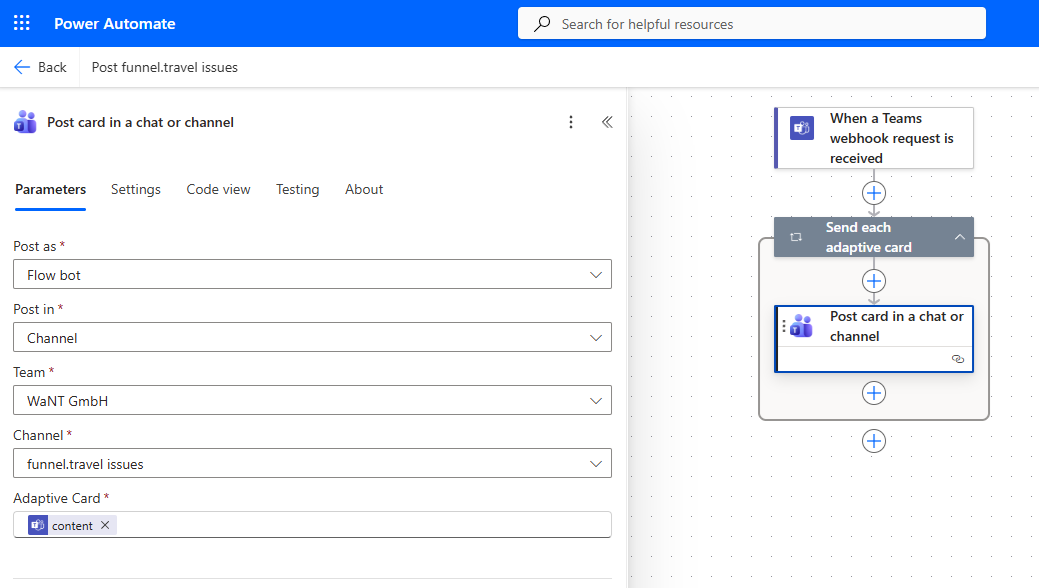
Use Microsoft "Power Automate" to create a workflow and add a "When a Teams webhook request is received".
Define the notification with type "Teams" and the Power Automate URL as notification target.
How do I retrieve a midoffice reference from a separate data stream?
This is a niche use case, but if a supplier is also on funnel.travel, there might be a case for getting the supplier midoffice reference into a data stream for later purchase matching.
For this setup, two instances of the "Booking data share" extension are required:
Setup on data supplier
On the data stream which "owns" the desired midoffice reference, configure the "Booking data share (produce)" and define a random trust key (ideally 32 chars or longer).
Setup on data consumer
On the data stream which wants to read the above midoffice reference, configure the "Booking data share (consume)" and use the same trust key.
With the above setup, the "data supplier" will trigger whenever booking data changes. Ideally, the extension is sorted after the midoffice extension.
funnel.travel core will then recognize the data sharing, and trigger all "data consumer" with the same trusted key and for the same booking reference.