The system which issues the booking reference number
Supplier
The system which will invoice the purchased travel services
Provider
The entity actually providing the travel service, typically an airline code, hotel chain or similar. For ad-hoc packages, this is often equal the 'Supplier'
Agency
Travel agency identifier
Product
Product key, most commonly catalog number for a packaged tour
AERTiCKET
The AERTiCKET extension processes Matrix XML from AERTiCKET.
Execution trigger
Needs to be set to "WEBHOOK", as XMLs are pushed via the funnel.travel dataexchange server.
Agency number
Provided by AERTiCKET, also referred to as "KIM".
Customer system
The AERTiCKET extension allows to read a customer reference from the AERTiCKET "Interne Vorgangsnummer".
If set, the customer number will be set using the provided 'customer system'. This is relevant for any downstream extensions looking for a system-specific customer number.
Example: if sending data on to Gestour, the agent can enter a Gestour customer number, and configure "Customer system" to "Gestour".
Only invoiced
If set, unticketed flights are discarded
Further processing rules:
The Cockpit XML is used to fetch the retail price shown in the AERTiCKET cockpit. If "fare + tax" in the Cockpit XML deviates more than 3% from
the Matrix XML, retail prices are discarded (these happens on some rebooking cases where the Cockpit XML is not updated)
The AERTiCKET "surcharge" is split onto each ticket as additional price item.
Custom field names
This extension provides custom field values:
branch
Taken from AFW2BRANCH remark, if present
invoiceNumber
Taken from the latest AER XML
Booking properties
Source domain
Booking platform used, e.g. Amadeus
Supplier
AERTiCKET
Provider
Airline code
Agency
AER agency number
Product
empty
Amadeus A.I.R.
The "Amadeus AIR files" extension allows to read PNRs from files created by the Amadeus ProPrinter. The extension can work both as "pull" or "push".
If you'd like the extension to "pull" AIRs, you need to set up an SFTP server with username/password access. Configure the extension with "Time" event,
set your desired CRON expression, and configure the SFTP properties. Per execution, the extension will read all available files, and subsequently
delete them from the SFTP server..
If you'd like to "push" files to the extension, configure the extension with "Webhook" event and leave the file store controls empty. Once the extension
settings are saved, funnel.travel provides you with a webhook URL. Upload files as multipart (using 'file' as parameter name). An example Windows Powershell
script which uploads files can be found here.
Data scope settings
Process ghost segments
If checked, GK segments will be included in the generate booking data
Include travel preferences
If checked, seat and meal information will be included in the generate booking data if present in the PNR
Include passport data
If checked, SR DOCS will be included in the generate booking data
Include remarks
If checked, AIAN/RM/RX will be included in the generate booking data
Booking properties
Source domain
Amadeus
Supplier
Amadeus
Provider
Airline code
Agency
OID
Product
empty
Atriis
The Atriis extension uses the Atriis "Get Trip" to periodically fetch new and updated trips.
Execution trigger
Needs to be set to "TIME", as Atriis has no "push" mechanism.
Currency handling
Use display currency price items will be in "display currency" (=retail currency) (unless only "default currency" (=system currency) is provided)
Use system currency price items will be in "default currency" (=system currency)
Buy in system currency, sell in display currency price items will have retail prices in "display currency" and purchase prices in "default currency"
Discard from sources
Allows to list Atriis source systems for which services should be dropped.
E.g. setting "Amadeus" will then discard all travel services booked in the Amadeus GDS. Multiple entries should be separated by comma or semicolon
Discard flights only
Allows to restrict above 'Discard from sources' setting to service type 'flight' only
Allow cross-modifies
If set and configured together with other producer extensions such as e.g. Sabre WS,
funnel.travel will allow modifying an Atriis-generated booking by a Sabre PNR import.
Access credentials
Agency ID, endpoint, username, password and "shared key for credit card" will be provided by Atriis
Further processing rules:
If a "CorporateReference" is present, this overrides OrganizationUnitId as the agency ID
Payments: payments are imported where the data indicates the agency has made a payment. Hotel guarantees are not imported as payments.
Furthermore, low-cost carrier payments are never imported.
Hotel and rental car services are imported with price 0.00 unless IsPrePaid=true
Booking properties
Source domain
Atriis
Supplier
Atriis
Provider
Supplier code if 1 service booked, otherwise 'Atriis'
Agency
CorporateReference or OrganizationUnitId
Product
empty
ATOL
The "ATOL" extension allows to create an ATOL PDF and send it to a standard email address.
Protecting ATOL holder
The name of the ATOL holder, i.e. the company financially responsible.
ATOL Certificate issuer
Name of the ATOL Certificate issuer, the company the traveler is dealing with
ATOL number
The ATOL number
Incl. flight-only
By default only single-package ATOLs are created, i.e. the extension looks for a flight plus an additional service.
By activating this setting, the extension will also issue flight-only ATOLs
Include unconfirmed
By default, only confirmed services are considered. For agencies selling trips in the far future, flights or other
services might remain open, but the ATOL must be issued immediately. In these cases including unconfirmed is required
Send to email(s)
Comma-separated list of recipients
These custom field mappings are available:
agentFirstName
agentLastName
agentEmail
category
If the "agentEmail" is present it is set as CC on the ATOL email. If "agentFirstName" and/or "agentLastName" are present, the name will be added to the email subject.
The "category" can be used together with the Nezasa field "atolClassification" to force a certain ATOL type.
Bexio
The "Bexio" extension allows to create and update quotes, invoices and purchase records in Bexio.
API token
Access token generated in Bexio
Create quote
If set, the booking will be mapped to a Bexio quote
Create retail invoice
If set, the booking will be mapped to a Bexio invoice
Revenue account
The default revenue account number (usually 4 digits). Only needed when creating invoices.
Create purchase invoice
If set, the booking will be mapped to a Bexio purchase entry
Expense account
The default expense account number (usually 4 digits). Only needed when creating purchases.
Default customer
Identifies a default customer for quotes/invoices. Syntax is
<searchfield>:<searchterm>
see the Bexio documentation for possible 'searchfield'. Typically 'nr' is used, as in 'nr:123456'.
On customer multi-match
If the booking has a customer reference which results in multiple customers being found, should the system:
Use default customer: use the above 'Default customer' setting
Use first match: just take the first search result
CETS WDM files
The "CETS WDM files" extension allows to read XML files from CETS created by the WebDataMover (WDM). The extension can work both as "pull" or "push".
The behavior and handling is identical to the Amadeus AIR files extension.
Consolidate purchase
The "Consolidate purchase" extension creates consolidated purchase bookings, which can then be sent on to any consumer. The grouping is defined by a custom field
groupBy
The extension should be used on a timed basis, typically once every night. On execution, the extension:
Find all custom field values for "groupBy" for which bookings were updated since the last execution
Find all bookings which have one the custom field values found above, either on booking- or service-level
Consolidate above bookings per "groupBy" value
The grouping rules follow those of travel number handling. A service is grouped if:
the service defines its own groupBy value
the service has a shared product information "group = true"
the service has a shared product information "type = upsell-item" or "type = baseService"
the service has a reference which matches on the PACKAGE entries in the booking
A consolidated purchase booking will only ever have 1 service for a given provider. The reference number on that service is derived from the grouping key, and
is not the real-life supplier's reference number.
cytric cCBD
The cytric cCBD extension allows to receive booking updates from the "cytric Companion for Booking Data" (cCBD)
While the setup of cCBD in funnel.travel is straightforward, the required setup in cytric is not trivial, so please contact us if you're
interested in connecting cytric to funnel.travel.
Also see the funnel.travel Using cytric blog post.
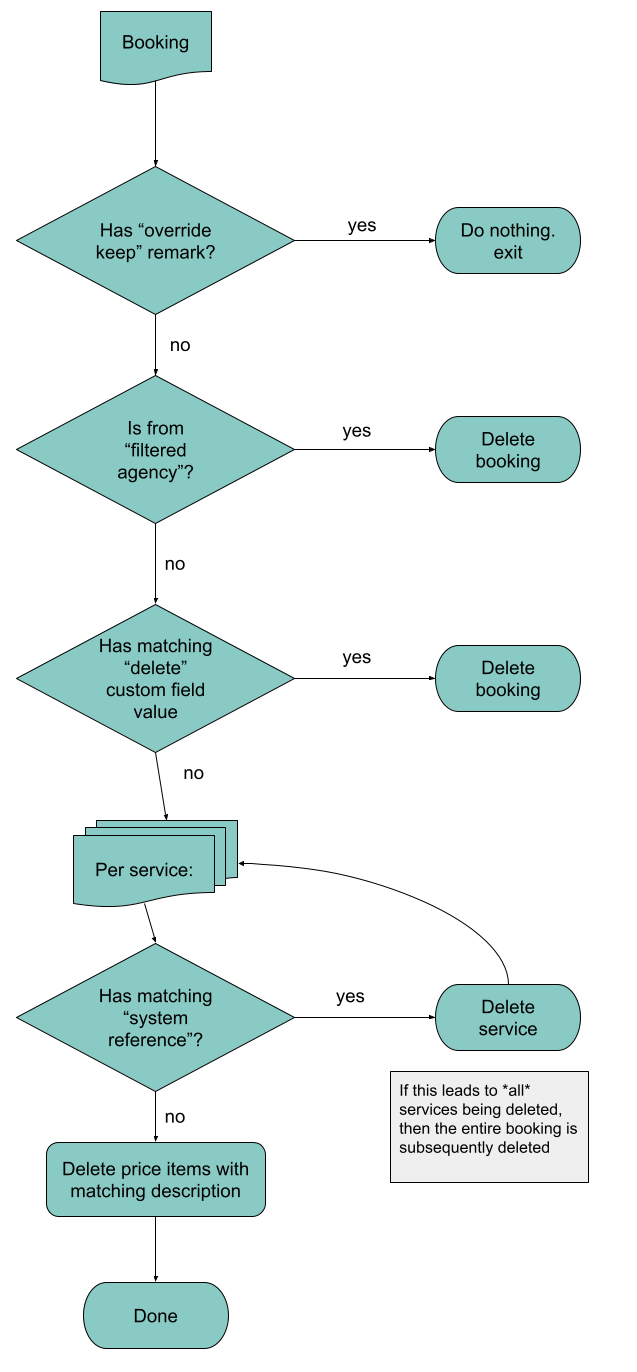
Data filter
The Data Filter extension allows to selectively delete parts of a booking, or even an entire booking. This is useful if the entire data stream needs some data removed.
Filter agencies
Comma-separated list of travel agency IDs
Agency filter type
Filter logic for the listed agencies
Keep these, delete all others: treat the list as a whitelist, bookings for all other agencies are deleted
Delete these, keep all others: treat the list as a blacklist, bookings for these agencies are deleted
Overriding keep remark pattern
If non-empty and a remark matching the regular expression is found,
processing is aborted. If the remark is on service-level, processing for that service is aborted. If the remark is on booking-level, processing for the booking is aborted.
This setting takes precedence over any other.
Check custom field name
Navigate to Custom fields, and add a name of your choice for the "Data filter" extension.
Then, enter that name in the "Custom field name" setting.
Custom value pattern
Regular expression to match custom field values against.
If a match is found on an entry on booking-level, the entire booking is deleted
If a match is found on an entry on service-level, the corresponding service is deleted
Filter services with system reference
Comma-separated list of systems (Service > References) to check for
Match logic
Matching logic for the systems listed above
All entries: delete if all references match
Any entry: delete if any reference matches
No entry: delete if no reference matches ("keep")
Only service type
Optionally restrict filter logic to a certain service type
Except for reference agency/OID
Disregard references (Service > References) with one of the listed agency/OID
Delete priceitems matching
If non-empty, deletes price items with a description matching the regular expression
Confirmation E-mails
The "Confirmation E-mails" extension connects to an IMAP email account, reads all emails for a given folder, and uses a third-party provider to parse the email.
E-mail server (IMAP)
A server name, optionally with a port number (default is 993). The connection uses SSL/TLS.
Username
Username for the email server access
Password
Password for the email server access
E-mail folder
Foldername, use INBOX for the root folder
E-mail parser
Third-party system to use for the actual parsing:
Amadeus Trip Parser
Traxo Email Parsing
OpenAI Parsing
Amadeus
Traxo
OpenAI
Parser key ID
Client ID
Client ID
not used
Parser secret
Client secret
Client secret
Access token
Parser container
not used
Mailbox ID
The parser container in an OpenAI context can be several things:
Prefixed "model:", e.g. model:gpt-4o. Defines which model to use. This is the default for OpenAI if no prefix is provided.
Prefixed "deployment:", e.g. deployment:our-gpt-deployment. Defines which deployment to use. This is the default for Azure OpenAI if no prefix is provided.
Prefixed "prompt:", e.g. prompt:pmpt_68be. Defines which Prompt to use (for both OpenAI and Azure OpenAI).
Parser endpoint
Amadeus host
API endpoint
Base URL
As an alternative to providing access to your own email server, we're also happy to provide you with a dedicated email address on our server. With this setup, it is
your responsibility to forward any confirmation emails to the provided address.
Using this extension can be GDPR relevant, please make sure all the necessary approvals are in place before activating.
Using Azure OpenAI
When using the OpenAI parser with an Azure setup, there are a few details to note:
Make sure to choose a region which supports "assistants"
Make sure to define the parser endpoint with a query parameter describing the api-version, e.g. https://YOUR_RESOURCE_NAME.openai.azure.com/?api-version=2025-01-01-preview
As parser container, enter the Azure model deployment name instead of the OpenAI model.
Custom field names
This extension processes custom field values:
otaXml (booking-level)
invoiceNr (booking-level)
shipRoute (service-level)
cabinName (service-level)
Booking properties
Source domain
'Email'
Supplier
'Email'
Provider
empty
Agency
Email address used to retrieve the email
Product
Originating email domain
File dump
The "File dump" extension allows to export trip data as JSON or XML to a remote server.
Target URL
The target URL of your server. The server must be publicly accessible. While the URL format
does allow for adding username and password, use the additional fields in order to prevent exposing the password. Allowed protocols are ftp, sftp and https. Use of FTP is discouraged.
Username
Username for authentication to your server
Password
Password for authentication to your server
File format
One of: 'XML', 'JSON'
Pattern for target file
The target filename can use a date pattern like
tripdata-${yyyyMMdd-HHmmss}.xml.
Galileo MIRs
The "Galileo MIR files" extension allows to read PNRs from files created by the Galileo Print Manager. The extension can work both as "pull" or "push".
The behavior and handling is identical to the Amadeus AIR files extension.
Gestour
The Gestour extension allows to push booking data to the Amadeus Gestour 360 midoffice.
Agency code
Provided by Gestour
Default customer
Allows to set a default customer to receive bookings. Valid syntax is
Identify by email, e.g. max.mustermann@want.ch
Identify by Gestour-internal ID, using syntax key:123456 (where 123456 is the Gestour ID in this example)
Identify by account, e.g. H78MM
JM84D2
Brand
Optional, provided by Gestour
Ticket stock code
Provided by Gestour
On customer multimatch
Defines how customer handling should be the intial
customer search finds zero or more than one matches
Use default customery use the customer defined above as "Default customer"
Use first match use the first match found
Further processing rules:
Currently, only 'flight' services are sent to Gestour
Exchange are only sent if the booking already has a Gestour reference (i.e. a new booking already containing an exchange is dropped)
Common errors
Gestour has various settings which need to fit the bookings running through funnel.travel. This table gives an overview of the most common
errors.
Message
Cause
Problème d'enregistrement, la clé d'un item inséré est manquante.
A coded entry of the booking is not known in Gestour. Typically this is either an airline or a destination code.
Type de prestation du segment 0 incompatible avec son contenu
A fairly general-purpose error indicating that the Gestour segment data is deemed inconsistent. Check the booking
data in funnel.travel for empty fields such as airline or destination.
Le montant RTU doit être inférieur ou égal au montant client
This error indicates a negative ticket amount. While this could occur when importing a refund for which the original ticket is missing,
leading to a negative total amount. If the booking seems to be consistent, contact us so we can investigate.
Il manque le montant
This might occur on exchanges with a price 0.00. Make sure Gestour accepts a zero amount.
Erreur pendant la création d'une émission de titre
General-purpose error message that the booking couldn't be processed. Contact Gestour to get more information.
HtoH
The "HtoH" extension allows to send booking data to HtoH (Home-to-Home), a specialized travel management app and a business travel tool designed to create seamless, door-to-door itineraries.
These custom field mappings are available:
voucherUrl (service- and/or booking-level)
Hubspot
The "Hubspot" extension allows to send customer and booking data to Hubspot. The integration uses Hubspot Service keys (BETA).
API URL
This is typically https://api.hubapi.com/
Service Key
Create in Hubspot via Settings > Account Management > Integrations > Service keys.
Required scopes are crm.objects.custom.write, crm.objects.contacts.read, crm.objects.contacts.write, crm.objects.custom.read
Lambus
The "Lambus" extension allows to send booking data to Lambus, your All-In-One Travel Planner.
The MCTO extension allows to send booking data in the MCTO format.
Recepteur
Provided by the midoffice partner
MCTO type
Define MCTO content type
Full: all services are added to a single MCTO
Partial: services (and tickets) are split into multiple MCTO
XML processor
This setting allows for a few proprietary MCTO customizations
- : standard MCTO
IGA T-9: MCTO with IGA-specific remarks
ViaXeo B2C: MCTO with ViaXeo-specific details for a B2C record
ViaXeo B2B: MCTO with ViaXeo-specific details for a B2B record
Additional delivery attribute
Ony needed for IGA
Target URL
Provided by the midoffice partner
Username + password
Provided by the midoffice partner
Midoco
The Midoco extension uses the Midoco "AnnounceBookingMessage" to create and update bookings in Midoco.
Organization unit, username, password and token
Credentials for a technical Midoco user with webservice access
Include exploring
If set, all booking data is sent to Midoco. If not set, only status 'CONFIRMED' and 'CANCELED' are sent.
ABM strategy
Allows to specify a custom strategy to create the AnnounceBookingMessage towards Midoco.
Duplicate supplier+ref
Midoco needs unique combinations of LT code + booking reference. If there are duplicate entries:
Add ref.-no. suffix: will add a '-1', '-2', ... suffix to reference numbers
Merge upsell / add ref.-no. suffix : same as above, except that upsell will be grouped with the main service. The upsell entry will be updated to have a matching service type,
and date will be narrowed down to the date range of the main service.
Create leisure mix: will group all affected services into one Midoco booking
Comments
Allows to specify how remarks from Nezasa should be passed on to Midoco.
Be sure to whitelist funnel.travel on the Midoco webservice user, activate the web service support, and to allow imports on the org. unit.
Field mapping and custom field names
The package supplier ID is taken from "booking supplier"; funnel.travel offers the option to customize suppliers programmatically.
There are several custom field mappings available:
marketingInfo .. this is used as a prefix for marketing info attributes, so "marketingInfoNzItineraryId" will map the value to the marketing info attribute "NzItineraryId"
attr .. this is used as a prefix for booking attributes, so "attrFoobar" will map the value to the booking attribute "Foobar". Note that this entry is case-sensitive.
destinationKey (mapped values should be 'eu' or 'noneu')
hotel.phone
rental.insurance
rental.excluded
event.description
shipRoute
cabinName
tour.groupSizeMin
tour.groupSizeMax
tour.guaranteedDeparture
tour.guidedLanguages
tour.beforeSegments
tour.afterSegments
If all agency.xxx fields are mapped and present, the agency address will be written to the Midoco "agency info" section.
Further processing rules:
If selling bookings in a currency other than the Midoco's org-unit default currency, this extension will set the "displayed-currency" on the booking prices. For this to work, the Midoco settings
"FX_CALC_CUSTOMER_SELLING_PRICE_EDITABLE" and "FX_CALC_CUSTOMER_SELLING_PRICE_EDITABLE_DEFAULT_SELECTED" need to be enabled.
For Nezasa integrations: if an "upsell" component has the same supplier and reference number as a non-transport component, the upsell/generic service is
added
to the main booking line.
Default behavior in this case would be to add a reference number suffix, but upsell components are typically invoiced together with the main service; this exception here ensures that the supplier
invoicing remains consistent.
Midoco ABM import
The Midoco ABM import extension allows to import booking data using the Midoco ABM format. Configure the extension as a webhook, and
communicate the endpoint as SOAP endpoint to the producer of the ABM.
If configuring locators such as org. unit locators, be sure to use "MidocoImport" as source and not "Midoco", as the latter is used
for the ABM export.
There are several custom field mappings available:
shipRoute
cabinName
Myclimate
The Myclimate extension takes flight data and adds CO2 information.
API URL
Provided by Myclimate
Username
Provided by Myclimate. Note that Myclimate typically only offers access
if there is also a compensation scheme in place.
Password
Provided by Myclimate
Nezasa
The Nezasa extension provides a webhook for Nezasa to trigger booking imports.
Distribution channel ID
One or several distribution channels (separated by comma or semicolon) for which funnel.travel will register webhooks.
API URL
Usually https://api.nezasa.com/
Username
The username of the Nezasa API user.
Password
The password of the Nezasa API user.
Webhook events
Nezasa events for which funnel.travel should retrieve and process a booking. Multiple events can be listed comma-separated.
Preferred reference system
If set, funnel.travel will import agency and supplier information with a preference for the configured external system.
If using this setting, make sure your reference data in Nezasa is adequately maintained.
Price import
Allows for different pricing scenarios. Most commonly the selection "Touroperator / Reseller" is used.
Sales price matching
Booking change in Nezasa can be handled with updating the sales amount, or keeping the original sales amount:
'none' : will disregard the itinerary sales amount and only use component amounts
'Match unrounded' : will make sure the customer sales amount is matched, unrounded
'Match rounded' : will make sure the customer sales amount is matched, rounded
Create date field
As extension settings can be restricted by booking create date, this setting allows to use
either the 'created' or 'firstBooked' as create date.
Missing travel dates
Nezasa allows for a generic adhoc service without travel dates. As a downstream extension might require travel dates,
this setting allows for:
Leave empty: leave the service without travel dates
Use itinerary start/end date: take the overall booking travel dates, and map start/end resp.
Use itinerary start date: use the overall booking start date for any missing travel date
Use itinerary end date: use the overall booking end date for any missing travel date
Write-back midoffice number
If enabled and the account has a configuration with an extension setting the "Midoffice no.", this entry will
be published back to Nezasa.
If enabled, funnel.travel will attempt to retrieve additional agency information
Nezasa webhooks: Nezasa notifies attached system of bookings and booking changes via a webhook call. funnel.travel registers webhooks for the booking status
"booking_completed", "booking_change_completed" and "cancellation_completed". Note that there is no trigger for a booking in status "booking_initiated".
This means that purely offered/quoted bookings will not be pushed to funnel.travel.
Customer references
Customer references can be added in Nezasa by using generic ad-hocs with a category name "Customer reference". For such an entry, the "productName" will be split on the first slash, e.g.
CR/1234
Will result in a customer reference "1234" for the key "CR"
Field mapping and custom field names
The distribution channel is stored as "booking supplier"
A product can be marked as "optional" by sending a template tag "optional-nnn", where nnn is the product ID.
There are several custom field mappings available:
bookingId
bookingLang
externalRefId
alias
tourOperator
atolClassification
templateRefId
distributionChannel (DC ID)
distributionChannelName (DC short name)
promoCode
allotmentCode (uses a 'ftgrp-' or 'rnr-' prefixed template tag, see How to)
templateTagXxx where 'xxx' represents any prefix for a template tag entered as xxx-aaaaaa or xxx_aaaaa. Must be on level BOOKING
moduleTagXxx where 'xxx' represents any prefix for a module tag entered as xxx-aaaaaa or xxx_aaaaa. Must be on level TRAVELSERVICE
Provider of single service if 1 service booked, otherwise 'Nezasa'
Agency
Agency external reference, depending on setting 'Preferred reference system'
Product
Nezasa tour type, e.g. 'Individual'
Settings in Nezasa
In order to manage itinerary delivery to funnel.travel, make sure the "Enable Sync Booking Data action" setting in Nezasa is enabled on each DC connected to funnel.travel
Repackage suppliers
The 'Repackage suppliers' extension allows to overwrite suppliers; the use case is typically with dynamic packaging where a tour operator presents itself as supplier..
Set booking supplier
If set, the booking supplier will be overwritten to this value
Set service supplier
If set, the first found travel service reference system will be overwritten to this value
Service supplier exceptions
Comma-separated list of travel service reference systems which should not be touched
Sabre IUR files
The "Sabre IUR files" extension allows to read IURs from files created by the Sabre Printing Module (SPM). The extension can work both as "pull" or "push".
The behavior and handling is identical to the Amadeus AIR files extension.
Sabre Webservice
The "Sabre Webservices" extension allows to read PNRs from a Sabre queue.
The behavior and handling is identical to the Amadeus AIR files extension.
Slack
The Slack extension allows to set up notifications using Slack web hooks.
Webhook URL
The URL your Slack admin setup in https://api.slack.com/incoming-webhooks
Displayed username
Slack notifications display a username. If this field is left empty, the default username
defined on the web hook will be used
Message
Like most extensions, the Slack extension receives a full booking data structure.
Explore the structure at the funnel.travel API definition
to compose messages. Some examples:
Just booked trip ${header}
${participants[0].firstname} ${participants[0].lastname} will be traveling on ${departuredate}
Channel
Webhooks have a default channel (used if this field is left empty), but can post on any channel.
Emoji icon
Any emoji code supported by slack (https://www.webfx.com/tools/emoji-cheat-sheet/). If left
empty, the extension default :airplane: is used.
TravelCompositor
The TravelCompositor extension provides a webhook for TravelCompositor to trigger booking imports.
Microsite (optional agency)
The TravelCompositor microsite name. The name can optionally have an agency external ID as a prefix
in the format
agency ID @ microsite
Price import
The price mapping to be used:
Marketplace/Operator: import in "operator" currency, only operator-prices are imported
Microsite direct collection (paid by traveller): import in "microsite" currency, all prices are imported. The purchase-side is managed to reflect to "operator" sale prices
Microsite agency collection (paid by agency): import in "microsite" currency, all prices are imported except agency fees. The purchase-side is managed to reflect to "operator" sale prices
Agency retail: import in "microsite" currency, all prices are imported. The purchase-side is managed to reflect to "microsite" sale prices
Marketplace + Microsite: import in "operator" currency for purchase, and "microsite" currency for sales. All prices are imported.
The purchase-side is managed to reflect to "operator" purchase prices
Package supplier
Optional, allows to override the booking supplier
API URL
The base TravelCompositor URL, e.g. https://tripdesigner.myholidays.fr/
Username
The username of the TravelCompositor API user.
Password
The password of the TravelCompositor API user.
API user microsite
Set if the microsite of the API user is not the same as "microsite".
Broadcast webhook
If the TravelCompositor booking data should be processed by multiple setups within funnel.travel:
Define one setup with "Broadcast webhook" = true.
Configure the webook of above setup in TravelCompositor
Define one or more additional setups with "Broadcast webhook" = false
Then the incoming webhook payload will be broadcast to all additional settings with a microsite matching that of the webhook.
Webhook and Broadcast
TravelCompositor webhook: TravelCompositor requires a manual setup of the webhook in the microsite configuration. Copy the webhook URL from the funnel.travel extension settings (once saved).
On an incoming webhook payload, and if the extension has "Broadcast = true", the webhook payload is "broadcast" twice within funnel.travel:
The first broadcast key is the "micrositeId" in the webhook payload. This allows to target a microsite-setup for a tour operator.
The second broadcast key is a composite of agency + microsite, in the format
<agency.externalId>@<microsite>
e.g. 998877@funneltravel. This allows to target an agency-setup for a microsite/tour operator.
Field mapping and custom field names
The microsite name is stored as "booking supplier"
There are several custom field mappings available:
microsite (booking-level)
service.long_description (service-level)
service.errorMessage (service-level)
hotel.phone (service-level)
voucherUrl (service- and/or booking-level)
cancellationPolicy (booking-level)
Booking properties
Source domain
TravelC
Supplier
Package supplier from settings, if present, otherwise microsite
Provider
Operator
Agency
Agency externalID
Product
TravelC trip type, e.g. 'ONLY_TICKET'
TravelOperations
The TravelOperations extension allows to push booking data to the TravelOperations midoffice.
Commission product
The TravelOperations "ItemNumber" for a commission (booking-level 'SUPPLIER_ONLY' price items with a negative purchase)
Surcharge/discount product
The TravelOperations "ItemNumber" for a other booking-level amounts (any booking-level price item which is not a commission)
Customer template
The template key to create direct customers (B2C), e.g. '0003'
XML processor
Allows for configuration of a proprietary processing logic
Endpoint
Provided by TravelOperations
API key
Provided by TravelOperations
If using project orders:
API endpoint oauth token
Provided by TravelOperations
API client ID
Provided by TravelOperations
API client secret
Provided by TravelOperations
API endpoint project orders
Provided by TravelOperations
The extension will initially send all services, and then incrementally only send updates on any changed service.
Field mapping and custom field names
TravelOperations allows for a definition of product template IDs. The TravelOperations extension will send:
Travel service type
Product template ID
Flight
FLIGHT
Hotel
ACCOM
Rental car
CAR
Bus
BUS
Ship
SHIP
Train
TRAIN
Misc / Transfer
TRANSFER
Misc / Insurance
INSURANCE
Misc / Event
ACTIVITY (as ProductsOTHER)
Misc / Other
ADHOC
The TravelOperations "ItemNumber" is derived from the service type plus vendor, e.g. a hotel with vendor ATI will result in an ItemNumer "hotel-ati".
To distinguish B2B from B2C bookings, the following ruleset is in place:
By default, all bookings are regarded as B2B. funnel.travel customers can define proprietary rules on how to detect a B2C booking.
For all bookings, the booking > agent is set as "Consultant".
For B2B bookings, the booking > customer is assumed to be an agent. The agent's email will be set as "PDFEmail", and the agent's name as "Attention".
For B2B bookings, the TravelOperations customer account is that of the booking > travel agency.
For B2C bookings, the booking > customer is assumed to be an retail customer. The customer data is mapped to "ExternalSystemCustomerDetails".
For B2C bookings, the TravelOperations customer account is never set.
These custom field mappings are available:
commissionVat
supplierTag
projectOrder
bookingTitle
agentFirstName
agentLastName
agentEmail
hotel.phone
Umbrella.net
The Umbrella.net extension allows to push booking data to the Umbrella.net midoffice.
Agency mapping
Allows to influence the origin and agency ID sent to Umbrella.net
Use original agency sends the producer's Booking source (e.g. 'Atriis') and the booking's agency ID as agency ID
Use passive GDS agency attempts to find a GDS entry in the service references and uses that reference. Furthermore, a matching
GDS entry will be sought in the agency locators.
Default agency ID
Default agency ID, see processing rules below.
Only confirmed/invoiced
If true, only confirmed and/or ticketed services are sent to Umbrella.net
EMD-A as ticket
Allows to define whether EMD-A should be imported as "ticket" in Umbrella.net, or as a simple price position.
Remark processor
Setting a 'remark processor' allows for processing Atriis
Standard processes savings ('UMB-SV/') and fare paid ('UMB-FP/') remarks, and sets the B2B 'guiding customer'
if using a profile system
Hero extends 'Standard' with a series of RM-entries (please contact us for detailed information).
Low cost service code
If set, "Non-BSP flight" services will use this product code
Smart modify
If set, bookings changes which do not affect Umbrella.net are dropped.
While this can reduce data if the producer sends updates irrelevant to Umbrella.net, enabling this feature may not be advisable if the producer has some sort of
"Sync with midoffice" function, where the agent expects a reaction in Umbrella.net.
Further processing rules:
The agency towards Umbrella.net is determined by:
If the trip's organization defines a fitting agency code, that one is used. 'fitting' in this context means a GDS code
when using "Agency mapping" = "Use passive GDS agency", and a code with "Source" equalling that of the booking's source domain when using "Agency mapping" = "Use original agency".
If the extension settings define a "Default agency ID", that is used.
Finally, if the booking data provides an agency ID, that is used.
Markup is added to the ticket fare price
If agency mapping is set to "Use passive GDS agency", a rail service is exported with Origin = "Railticketing"
If a hotel booking is for multiple rooms, a free text "Number of rooms" is added
Payments are marked as method BSP or DIRECT based on:
If the paid service is not a flight or refund, the method is DIRECT.
If the payment is for a ticketed document, the method is BSP if the reference number is BSP-formatted, and DIRECT otherwise.
If the payment is for an unticketed document or on service-level, the method is based on "Non-BSP flight".
Custom field names
This extension processes custom field values:
invoiceNr
Writes B2B 'invoiceNr' on booking level
ship.route
Writes B2B 'route' on ship service
ship.accommodation
Writes B2B 'accommodation1' on ship service
ship.dining
Writes B2B 'pensionDesc' on ship service
ship.promotion
Writes B2B 'remark' on ship service
provider.telephone
Writes B2B 'telephone' on the provider
ViaXeo
The "ViaXeo" extension allows to send booking data to ViaXeo. Note that while ViaXeo also supports the more general MCTO format,
this extension uses ViaXeo webservices which provide better data accuracy and processing flexibility.
Victoury
The "Victoury" extension allows to send flight tickets to Victoury ticket stock.
Further extensions
There are several more extensions being developed or in pilot-phase. If you're looking for a specific extension, contact us.