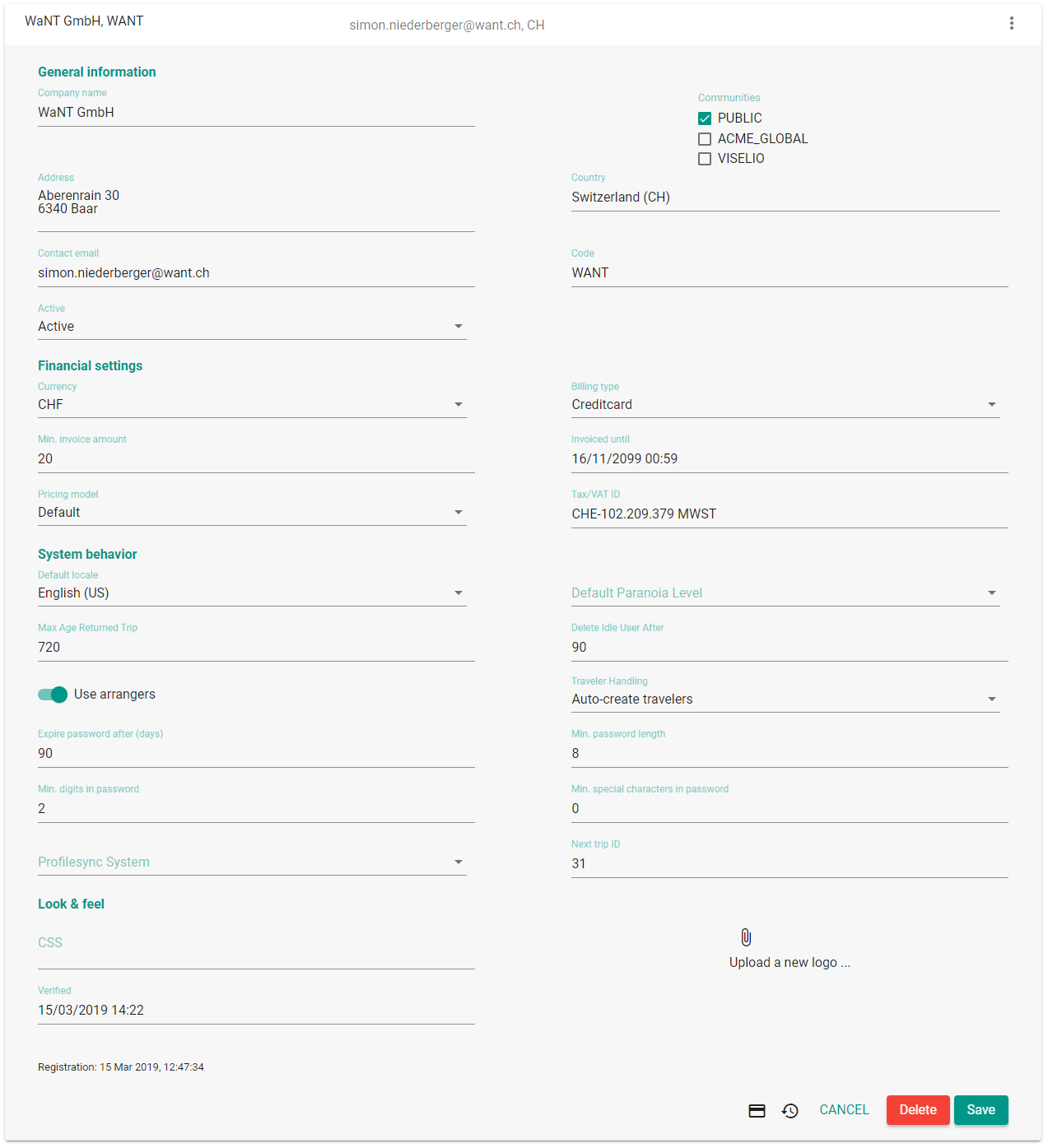
Influence the look & feel by adding a logo and/or defining your own CSS style
Note: After signing up for funnel.travel, an e-mail with a verification link was sent to the e-mail address provided during sign up.
Failing to verify will result in the account getting locked after 3 days.
GF67M1
General
Navigation
funnel.travel has a fairly simple structure. The sections are:
Trip
The dashboard shows business trips as they progress from "departing soon"” to "currently away" to "recently returned". The home button navigates back to the dashboard
Most pages show a search bar. The search term(s) entered cover all searchable properties, ie. searching for "jackson"
on the user page will search for "jackson" in the username, first and last name etc.
Property-specific search
To restrict a search term to a specific property, prefix the the term with the property name. Valid property name
can be found by clicking on the help icon help next to the search.
lastname:jackson
Range search
When searching for dates or numbers, often a range restriction is desirable. Valid restrictions are <=, >=, <, >
lastLogindate:>=01.01.2019
Wildcard search
For literal search terms, funnel.travel will automatically use a 'contains' strategy, ie. searching for 'ack'
will find 'Jackson' because that literal contains 'ack'. By providing wildcards, and/or adding operators
indicating your intent, you can help funnel.travel deliver better search results.
lastname:=jackson
lastname:=jack%
lastname:~jack
The first example will find users with an exact last name of 'Jackson'.
The second example will find users with a last name starting with 'Jack'.
The second example will find users with a last name containing 'jack' (this is the same as not providing an operator).
10HBF5
Auto-complete
There are two input field types which support auto-complete. References to other funnel.travel entities always offer autocomplete, while regular input fields for dates (or date/time)
will also expand the entry to a valid date
Entity references
Date auto-complete
Date(time) fields attempt to expand a user entry to the next date in the future. For European users (date format day-month-year):
153 will expand to the nearest March 15th in the future
15317 will expand to March 15th, 2017
GB6M8O
Data scope
funnel.travel shows your name, organization and account name in the navigation bar (top left). For users with the authority to manage multiple organizational
units (arrangers, client admin) or accounts (community admin, system admin), the displayed organization and account name switch to a dropdown
on hover.
UH7M23
Dashboard
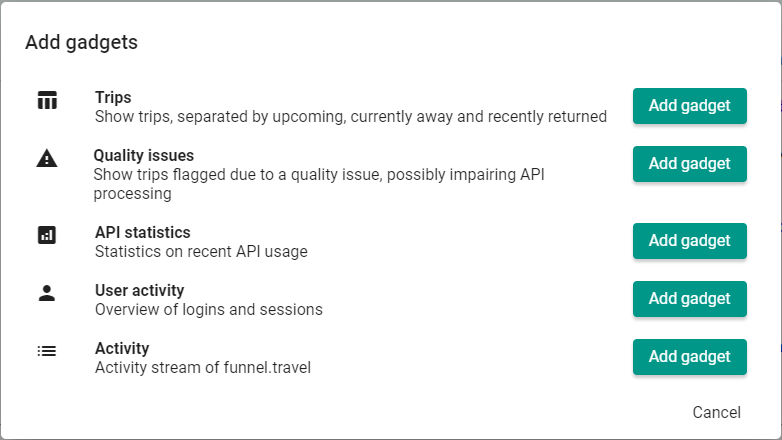
The "home" page of funnel.travel is a configurable dashboard. Gadgets can be added and arranged to immediately get an overview of the current status.
Available gadgets are:
The video below illustrates how the dashboard can be configured:
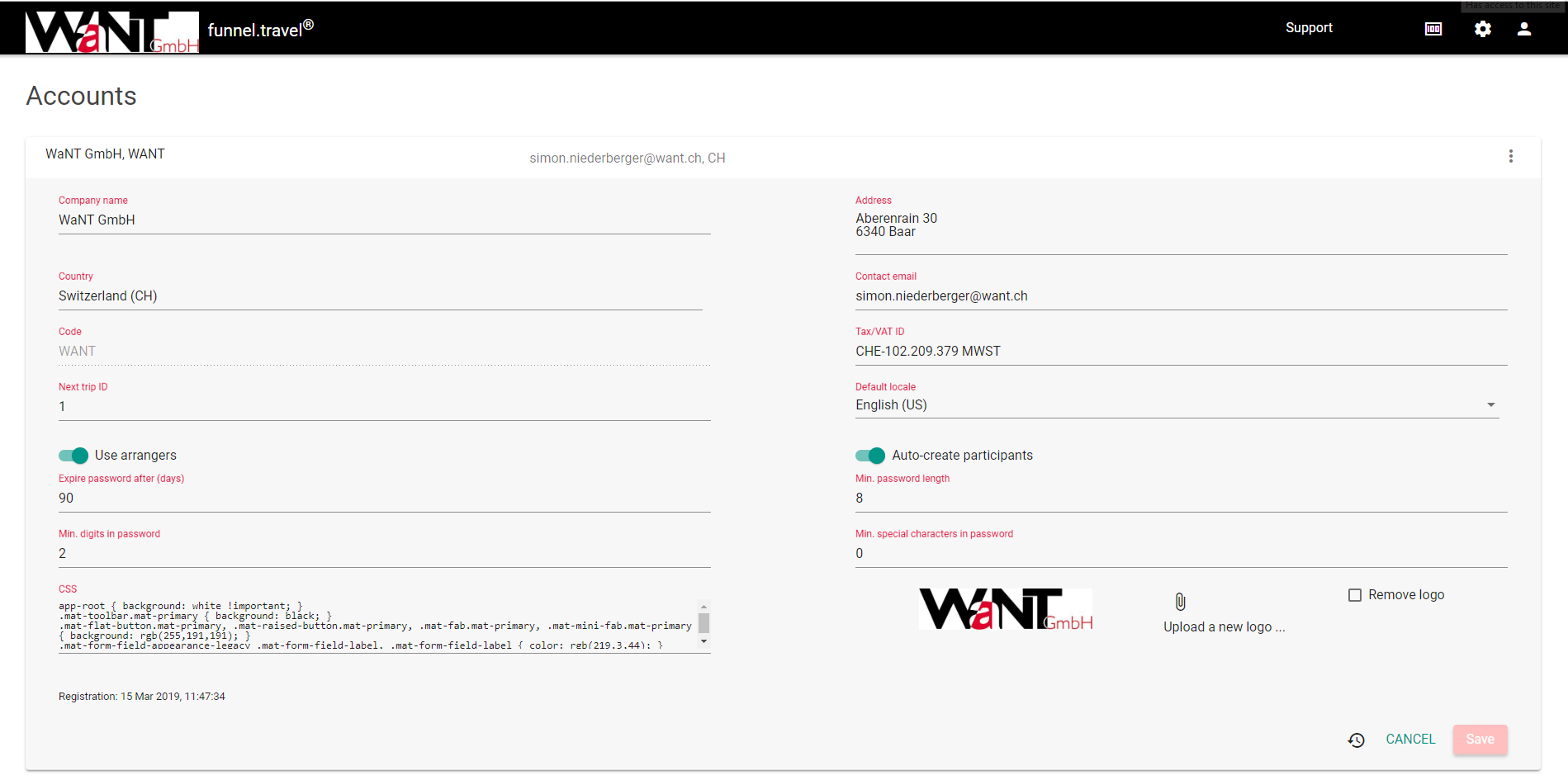
Billing account
A billing account serves several purposes:
Define some default system behavior
Define password security
Influence the look & feel of funnel.travel
Finally, the billing account is - as the name implies - the core entity driving invoicing of funnel.travel.
Is the entity funnel.travel will invoice. Defines a set of rules for password security. Allows for adding a logo and/or changing some CSS styles
Also, described in extensions in detail, the billing account holds the core extension setup.
Company name
Company name, max. length is 128 characters
Address
the address printed on the invoice
Country
The country relevant for invoicing. Note that each organization has a separate location/country
Code
The account code is mainly used internally, eg. in URLs
System behavior
Default locale
Locale used for new users
Max age returned trip
Trips with a return date older than the set value (in days) are deleted. Set to 0 to disable.
Delete idle user after
Users with a 'last returned' older than the set value (in days) are deleted. Set to 0 to disable.
Allow duplicate sources
If activated, funnel.travel will accept incoming booking payloads which are identical to the latest payload
already received for the same booking. This setting should usually be inactive, but some scnearios require re-sending the same data (e.g. changing setups)
Smart booking merge
If activated, funnel.travel will merge separate bookings for the same traveler into one trip.
See Matching to an existing.
Use arrangers
If activated, arrange-specific fields on user / organization are visible.
Traveler handling
When receiving booking data from a producer extension, funnel.travel attempts to assign a traveler based on email address. If no traveler is found:
"Auto-create travelers": if no matching user is found, a new one is created on-the-fly. The failure to create and/or match a user is registered as a quality issue.
"Manually create travelers": users are not created from booking data, but are assumed to be present. Thus, the failure to create and/or match a user is registered as a quality issue.
"Never create travelers": users are not created from booking data, and are not assumed to be present. The failure to create and/or match a user is never registered as a quality issue.
Password fields
These fields allow for adjusting the password security:
Expire password after (days)
Min. password length
Min. digits in password
Min. special characters in password
Use multi-factor authentication
Profilesync system
Allows for connecting funnel.travel to a traveler profile suite
Next trip ID
The next value for the funnel.travel trip identifier. Update with care, as setting to a lower value might result in
the system attempting to generate trips with an already used identifier.
Some extensions might require traveler profile data which is not present in funnel.travel. By connecting to a traveler profile suite
such as Umbrella Faces or Amadeus Cytric, funnel.travel can retrieve traveler
profiles and feed that data into the configured extensions.
Profiletool system
Umbrella Faces
cytric cCPS
Profiletool endpoint
URL of Umbrella Faces server
URL of cCPS endpoint
Profiletool API key
API key provided by Umbrella
CLIENT ID
Profiletool group
- not used -
cCPS system name
Profiletool secret
API secret
CLIENT password
Password security
The password security fields allow for defining password guidelines which are in line with your corporate standards.
After 3 failed login attempts, a user is locked out, and must request a new password
In case of a forgotten password, the password can be reset. The user will receive an email with further instructions.
If the account has enabled "Use multi-factor authentication", each user must set up MFA.
Look & feel
funnel.travel allows for two basic means of adjusting corporate identity. A logo can be placed at the upper left corner, the logo height is limited to 50px. Furthermore,
a custom CSS can be uploaded, with all the styling power which comes with CSS.
1VSG87
Organization
The main entity defining your corporate structure is the “organizational unit”. Users and trips are connected to an organizational unit.
Thus, whatever structure defines your travel rules (budget, expense limits) and/or processes (eg. arranger assignment) should reflected as organizational unit.
The name was chosen to be very generic, because organizational units can be many things:
Physical company locations such as London and Paris
Departments such as Sales or R&D
Last name ranges such as A-M and N-Z
Hierarchies such as junior consultants, managers and partners
Organizational units can have a parent organizational unit, which allows to map a hierarchy. Child organizational units inherit from their parent.
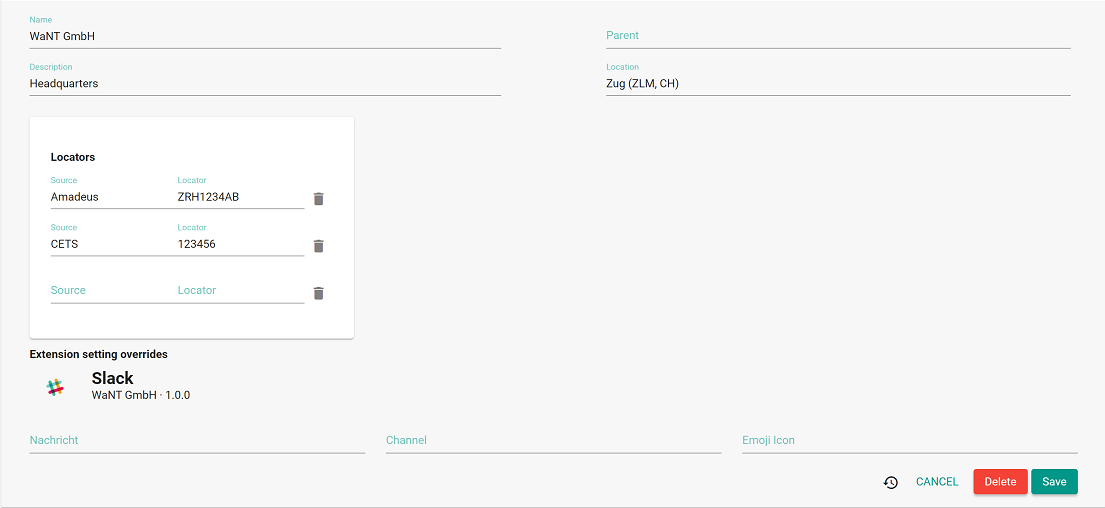
Name
Name of the unit, max. length is 128 characters
Parent organization
By setting a parent organization, hierarchies can be defined. This is especially useful
when working with organization-wide travel arrangers
Location
Geographical location of this organization unit. This location is used when processing
trip data to determine what is the "home base"
Description
A free-text description of the organization unit, max. length is 128 characters
Locators
Travel agency locators such as a CETS agency ID, Amadeus OID or Galileo PCC. If the
activated producer extension(s) have a status "source", locators can be used to assigned generated trips to organizations (and consequently consumer/modify extensions
can be called with overriding settings).
Extension setting overrides
If the account has activated extensions which allow for per-organization
settings overrides, those settings are listed here
Cross-account organizations
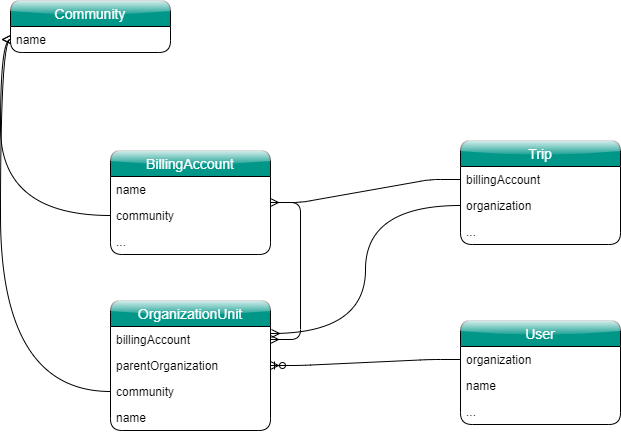
An organizational unit is linked to a billing account. It's noteworthy to point out that not all organizations of a hierarchy need to have identical billing accounts.
While these are exceptional cases, funnel.travel allows for a travel arranger to access trip data in a organization hierarchy while the underlying usage might get billed to different accounts.
The structure illustrated above allows for a variety of administration mappings:
An organizational hierarchy can be managed by multiple accounts. A client admin can search and edit ..
.. organizations assigned to the admin's account (exclusive administration)
.. users assigned to the admin's organization tree (mutual administration)
.. trips assigned to the admin's organization tree (mutual administration)
Parts of an organizational hierarchy can belong to different communities
7H8ZMQ
Users
Users in funnel.travel are held to a rather minimal data structure. Note that funnel.travel is not a traveler profile management tool.
Users are identified by email address, which is this expected to be unique per user.
FQZYLC
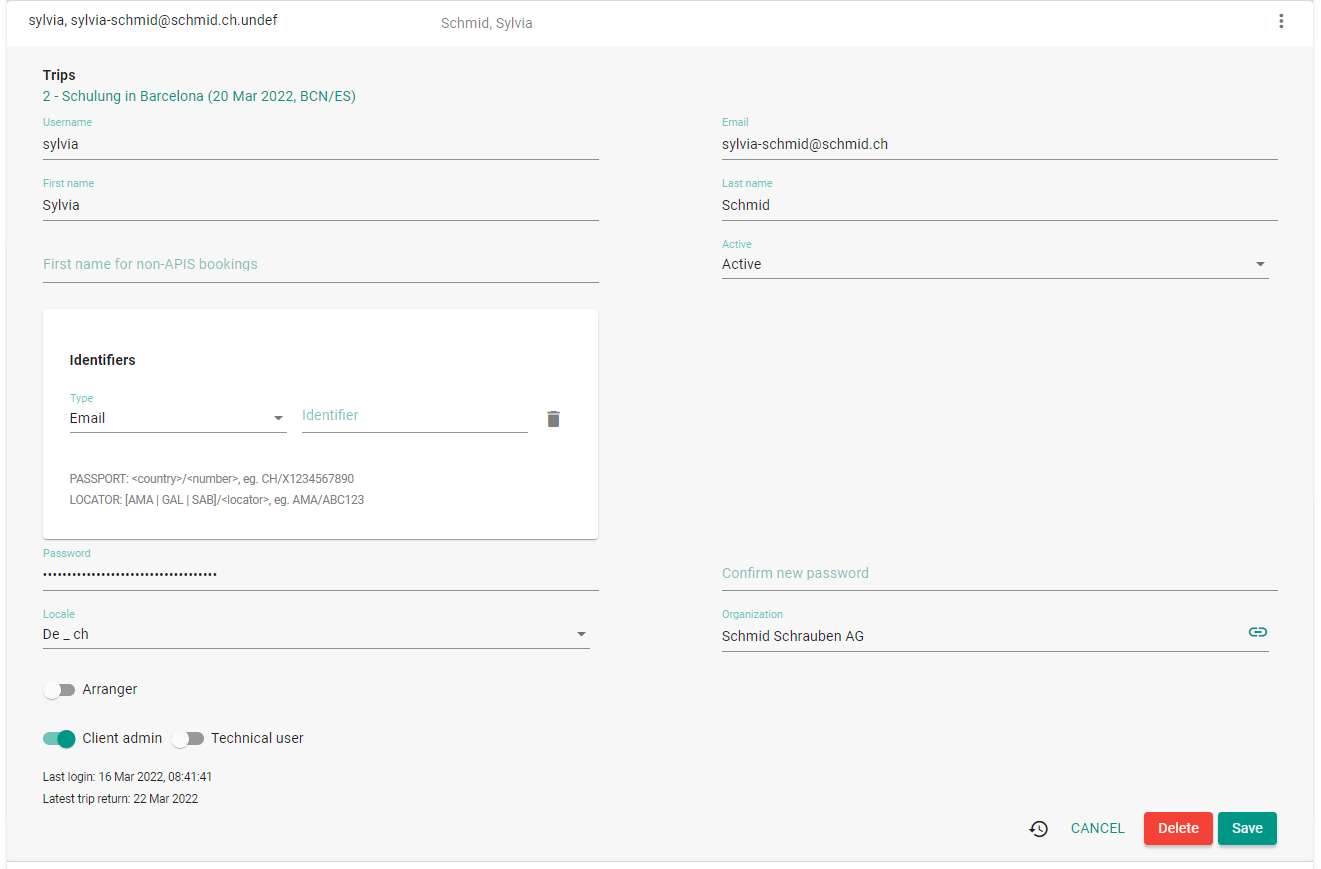
Apart from the typical user fields such as username and password, funnel.travel defines:
First name non-APIS
First name used for non-APIS bookings. e.g. Robert Brown might book hotels as Bobby Brown
Arranger / Arranger type
If 'arranger' toggle is enabled, individual travelers or entire organization units
can be assigned to the arranger (depending on arranger type)
Technical user
If activated, this user is used to assign organizational units via email lookup.
Identifiers
Agent identifiers such as an agent sign or email.
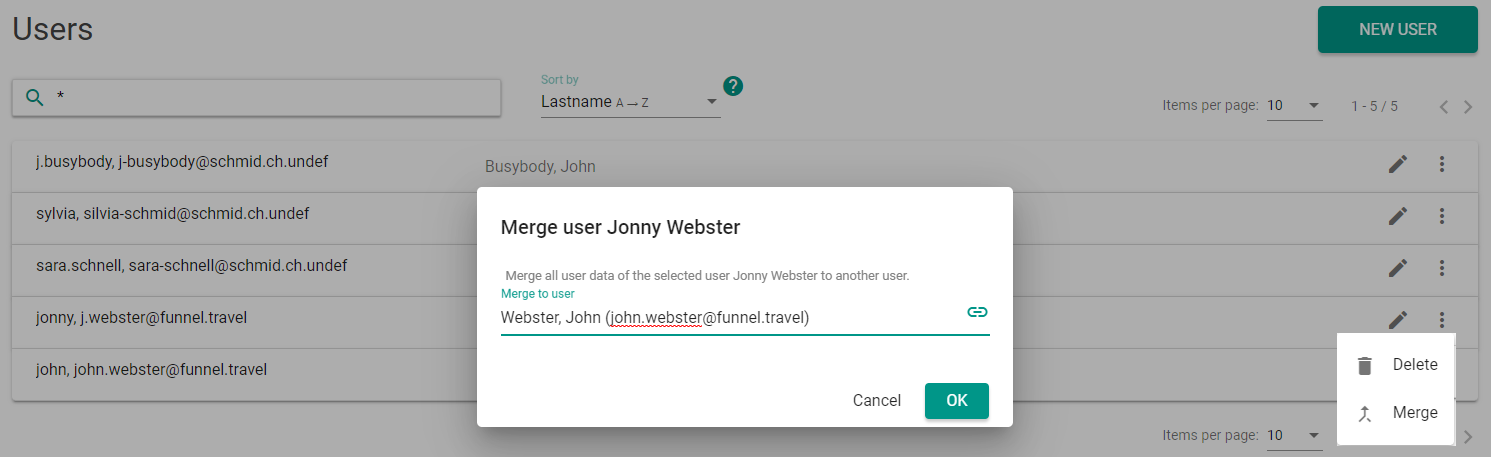
Merging users
Two additional users can be merged. This functionality is mainly used when "Auto-create participants" is enabled on the billing account,
as this might occasionally produce multiple entries for the same user.
TT5GB2
When merging a user Jonny to another user John:
The properties 'firstname', firstname for non-APIS bookings' and 'email' are copied from Jonny to John, provided they corresponding property
is empty on John.
All associations to bookings and transport documents (tickets, EMD) are moved from Jonny to John.
If Jonny is an arranger, all arranger mappings are moved from Jonny to John. If John is not already marked
as arranger, that flag is set, and the arranger type copied from Jonny to John.
Finally, the user Jonny is deleted
Custom fields
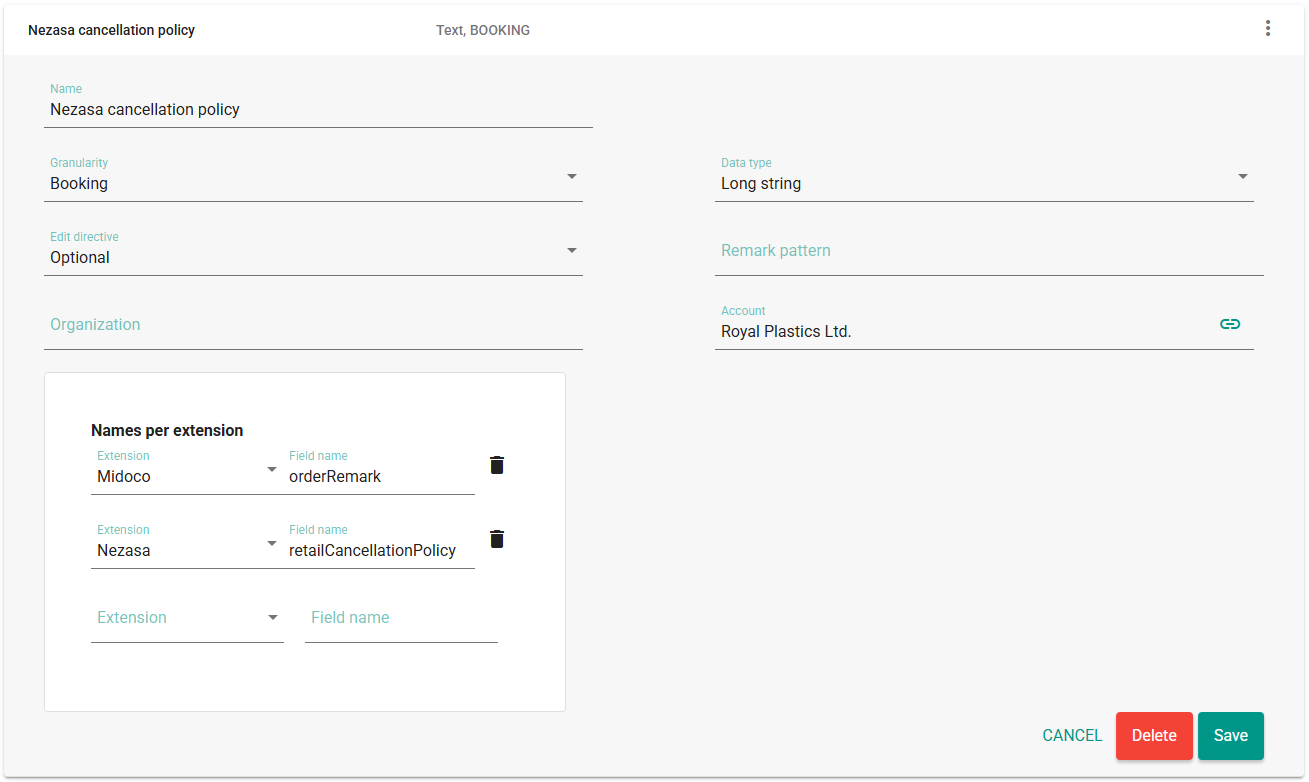
Custom fields can be defined to hold additional information on a trip, booking or travel service. Typical examples are a cost center or invoicing guideline.
Custom fields are always linked to a specific account, but can be further restricted to individual organization units.
QOG1SB
Name
Name of the field, which will be used to dislpay on the trip UI
Granularity
Defines on what level the field applies: 'Trip', 'Booking' or 'Travelservice'
Data type
'String', 'Long string' or 'Number'. Both string options can hold the same amount of data,
the difference is merely in the UI representation
Edit directive
Optional: Field is editable, but optional. If you're unsure, use this option
Mandatory: Trips cannot be saved without a value.
Hidden: Value is mapped on the trip, but not shown on the UI
Readonly: Value is read-only on the UI
Remark pattern
A regular expression which must contain exactly one group. The group value will be used
as custom field value.
AFW2BRANCH-(\d+)
for a remark AFW2BRANCH-22 will store the value '22'.
Names per extension
The "Names per extension" allow to create a link between extensions. Check the
extension documentation on possible field names.
Providers
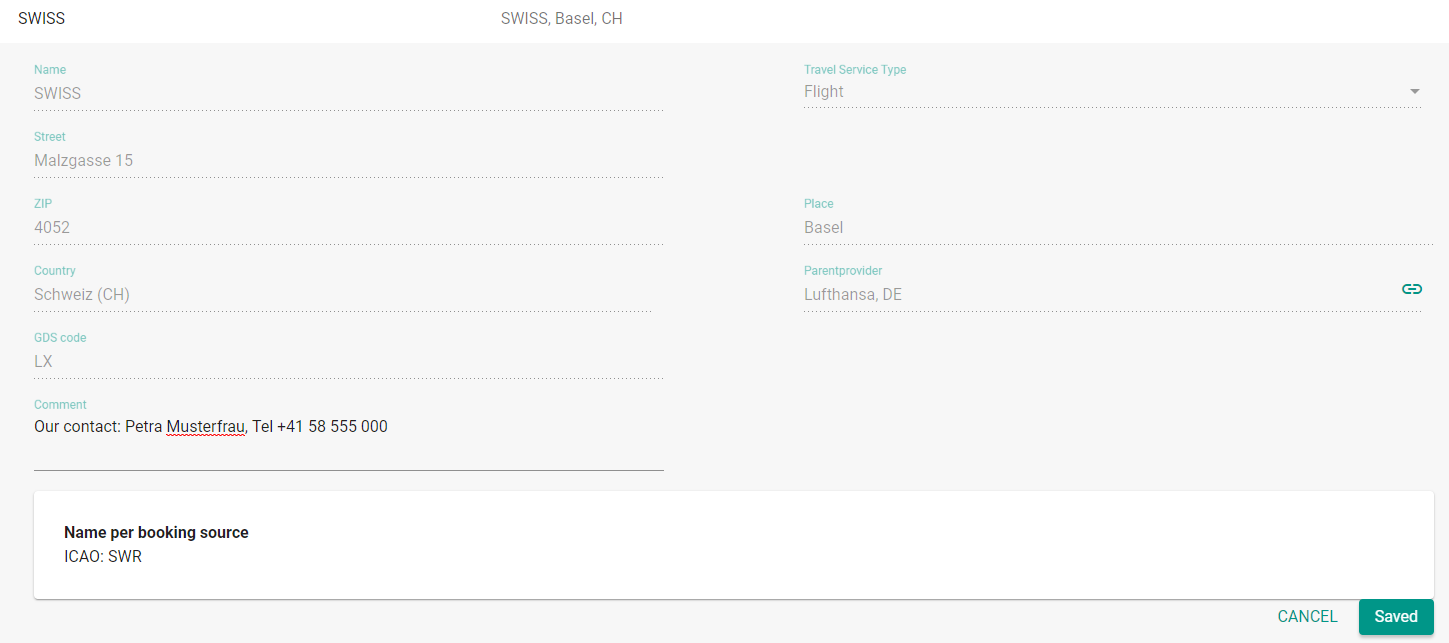
funnel.travel holds a global list of travel providers. Additional contact information, a comment field and extension-specific mappings are available per account or community.
R6C4Z6
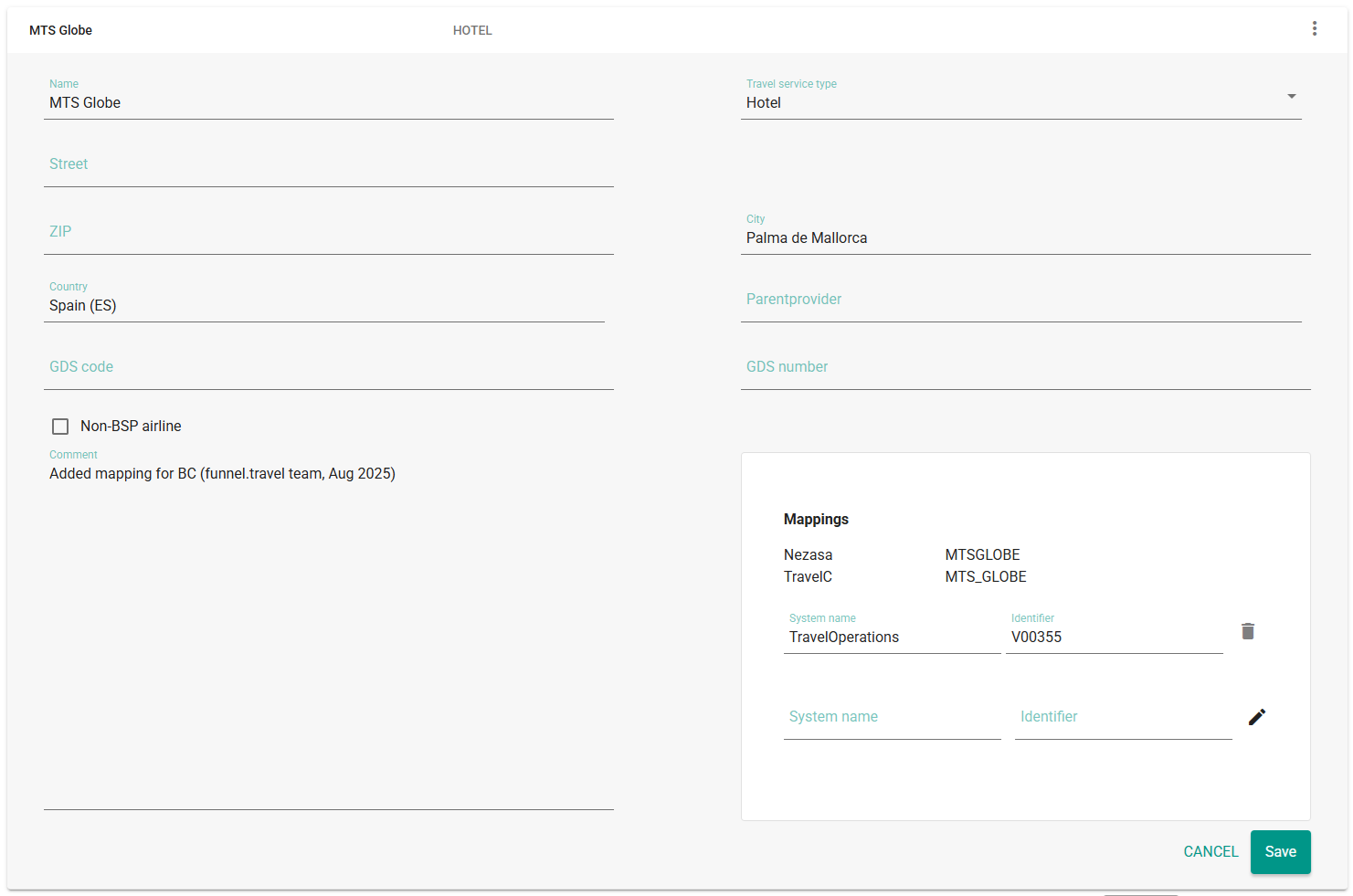
Mappings
RTHG78
funnel.travel maintains a hierarchical list of mappings:
On a system level, mappings are defined for producing extension with invariable supplier names
A community admin can add mappings community-wide by choosing data scope "all accounts" and adding mappings
A community admin or client admin can add mappings per account
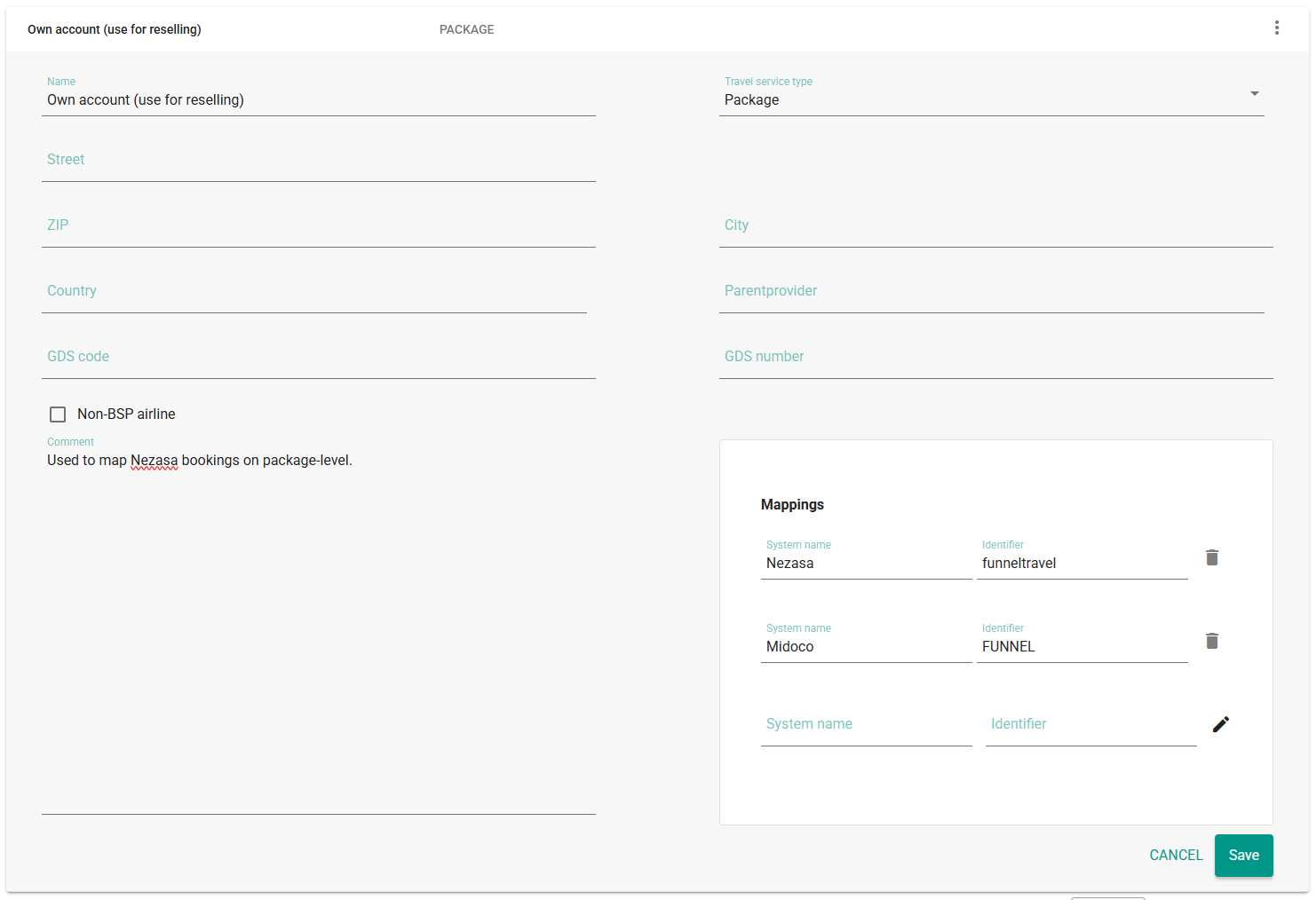
To resell entire bookings under your own supplier code, use the "Own account (use for reselling)" supplier and add incoming and outgoing identifiers.
The video below illustrates how provider mappings can be configured:
Example: map a TravelC supplier to a TravelOperations vendor code
Find the supplier in the list, check if there is already a global mapping for TravelC (and add if not), then add the TravelOperations vendor code:
Example: map all Nezasa bookings to a Midoco package LT
Take the "Own account (use for reselling)" supplier, add the Nezasa distribution channel(s) as incoming, and the default package code for Midoco:
Mapping use cases
Producer
Consumer
Setup
Sends fixed supplier ID
Expects fixed supplier ID
Add custom provider mappings for the producer and consumer system name
Allows for "external supplier IDs"
Expects fixed supplier ID
There are multiple options:
One option is to configure the desired consumer supplier ID directly in the producing system. funnel.travel might not recognize the supplier in such a case, but will pass on the supplier ID as desired.
Note that for funnel.travel to recognize the provider, the supplier ID mapping needs be added using the producer system name.
Another option is use the provider's standard ID and treat the scenario like the "fixed supplier ID" as describe above.
Sends fixed supplier ID
Allows for "external supplier IDs"
There are multiple options:
One option is to configure the supplier ID used by the producer directly in the consuming system.
Another option is use the provider's standard ID and treat the scenario like the "fixed supplier ID" as describe above.
A key consideration is where supplier management takes place. We typically recommend to configure as much as possible in the surrounding systems.
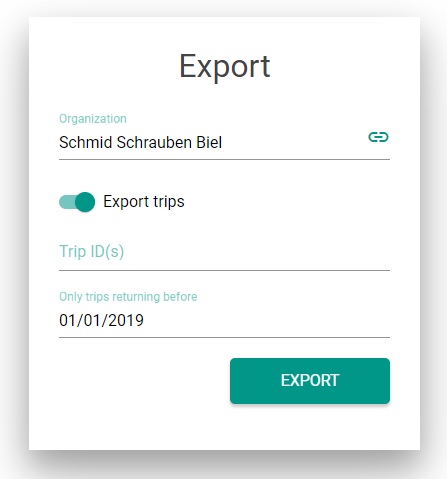
Data export
funnel.travel allows for exporting both configuration data as well as trips to JSON files.
VATNZC
Extensions
Extensions are where things get interesting. There are three kinds of extensions
Producers
Producers retrieve booking data from an external source such as an e-mail server, GDS or a TMC's midoffice system
Modifiers
Modifiers take booking data and enhance or change it.
Consumers
Consumers read booking data and report it to a third-party system.
Without at least one producer extension, all trips would need to be entered manually in funnel.travel. Without at least one consumer extension, trip data would reside in funnel.travel only.
2OFF4N
Producers
Producers deliver trip data into funnel.travel. There are several delivery mechanisms:
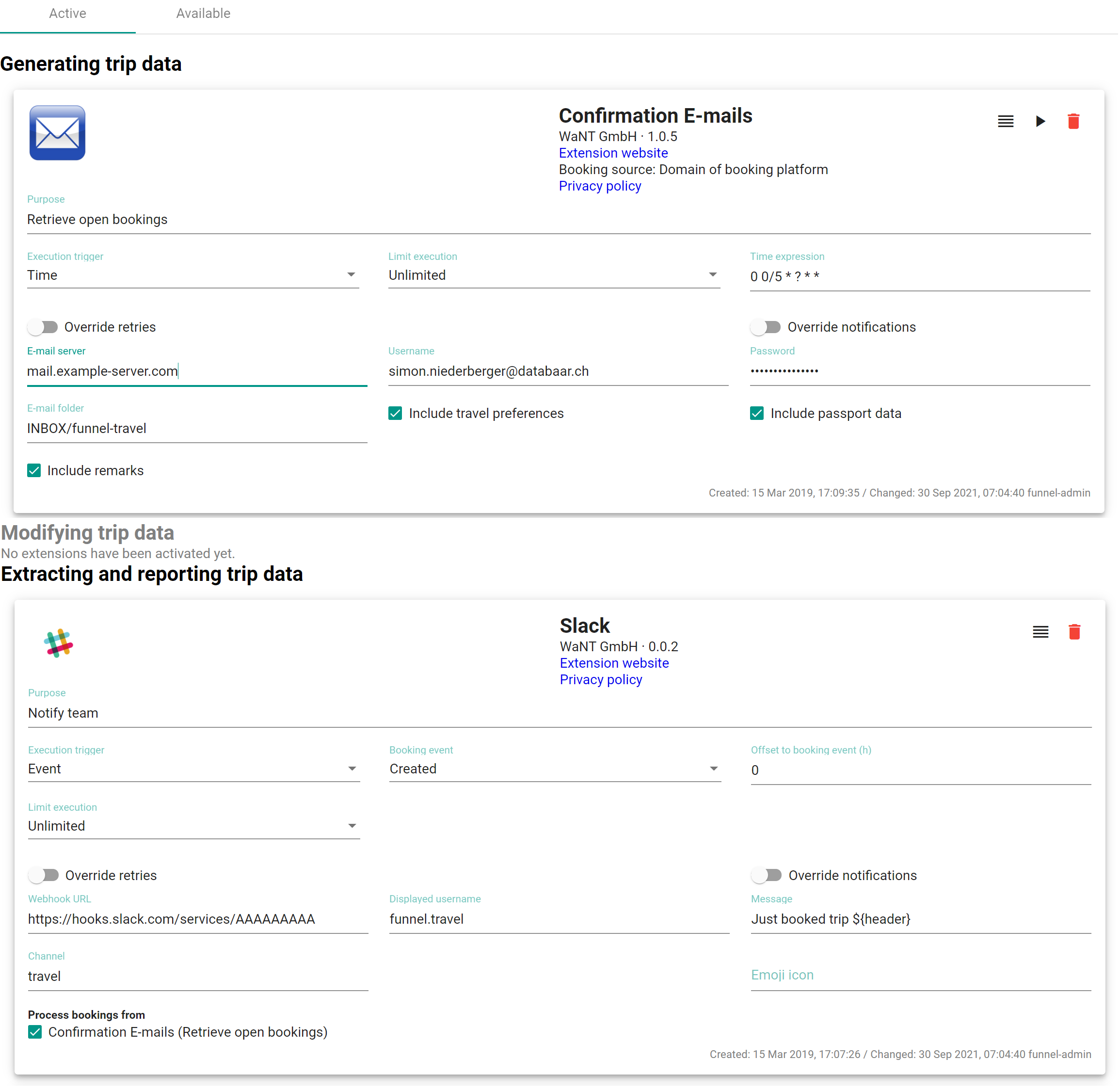
All producers share a basic configuration (and then additional, custom configurations per extension):
Purpose
Free text field to describe the setting, eg. "Import Amadeus PNR"
Execution trigger
Can be either "Time" or "Webhook"; the former represents a "pull" mechanism, the latter a push. When choosing "Time", two additional settings are available:
"Limit execution": "Once" will only process a booking if it's not already present in funnel.travel, ie. modifies are not processed. "Unlimited" will process modifies.
GDPR-related setting to indicate whether traveler preferences should be processed.*
Include passport data
GDPR-related setting to indicate whether passport data should be processed.*
Include remarks
GDPR-related setting to indicate whether booking remarks should be processed.*
* Whether or not to activate these settings depends on the data stream, ie. the activated modifiers and consumers. Only enable processing for data elements
which a modifier and/or consumer extension needs.
Modifiers
Modifiers read trip data from funnel.travel and send trip data back. This can be to augment booking data with eg. flight statistics, but can also execute a ticketing robotic and thus modify the PNR.
Modifiers have the same set of common configuration as Consumers, see the field table there.
Consumers
Consumers read trip data from funnel.travel. There are two delivery mechanisms: "Event" and "Time".
All consumers share a basic configuration (and then additional, custom configurations per extension):
Purpose
Free text field to describe the setting, eg. "Feed Viselio API"
Execution trigger
Can be either "Time" or "Event". When choosing "Time", an additional setting "Time expression" is available:
Allows to limit modifier/consumer to selected producers.
A common mistake is to choose an "Event"-based execution with "Created / modified" in order to process new bookings as well as modifies, but then to
leave "Limit execution" at "Once". This effectively disables the modify, as the booking creation will trigger the single execution, after which no more processing occurs.
Using offsets
When using an "Offset to booking event", funnel.travel will create a PENDING extension processing entry (visualized as an hourglass) with an entry date. A background process then regularly
checks for PENDING entries with an entry date older than the offset, and process any matching entries.
A key point to note is that any producer updates will cause the entry date to be re-set. Thus if a producer continuously updates a booking, the delayed processing get pushed back repeatedly.
Flow of extension calls
Scenario
Setup
Simple producer + consumer
No special settings needed
Producer + modifier + consumer
The consumer will only be called when the modifier was executed.
If using trip events, make sure the consumer doesn't just trigger on "Created". Due to the modifier, the trip event will be "modified" by the time it reaches the consumer
If using trip events and the consumer must only be triggered on booking creation, set trigger event to "Created / modified" and "Limit execution" to "Once"
Multiple modifiers
Modifier extensions are daisy-chained, in the order they appear in the extension setup. A subsequent modifier is only called once the previous was executed.
Multiple consumers
Consumers are called concurrently, so no consumer can count on having available the processing result of another consumer.
MKF5Z8
Extension states
Upon entering funnel.travel, extension states are stored per booking and configured extension. If the extension is only triggered in the future, the states remains as 'PENDING' until
execution time is reached.
For calls which resulted in an error:
Editing and saving a trip will re-trigger all erroneous extension states on that trip
Editing and saving an extension configuration will re-trigger all erroneous extension states (for the entire account)
EP09Q2
Notifications and retries
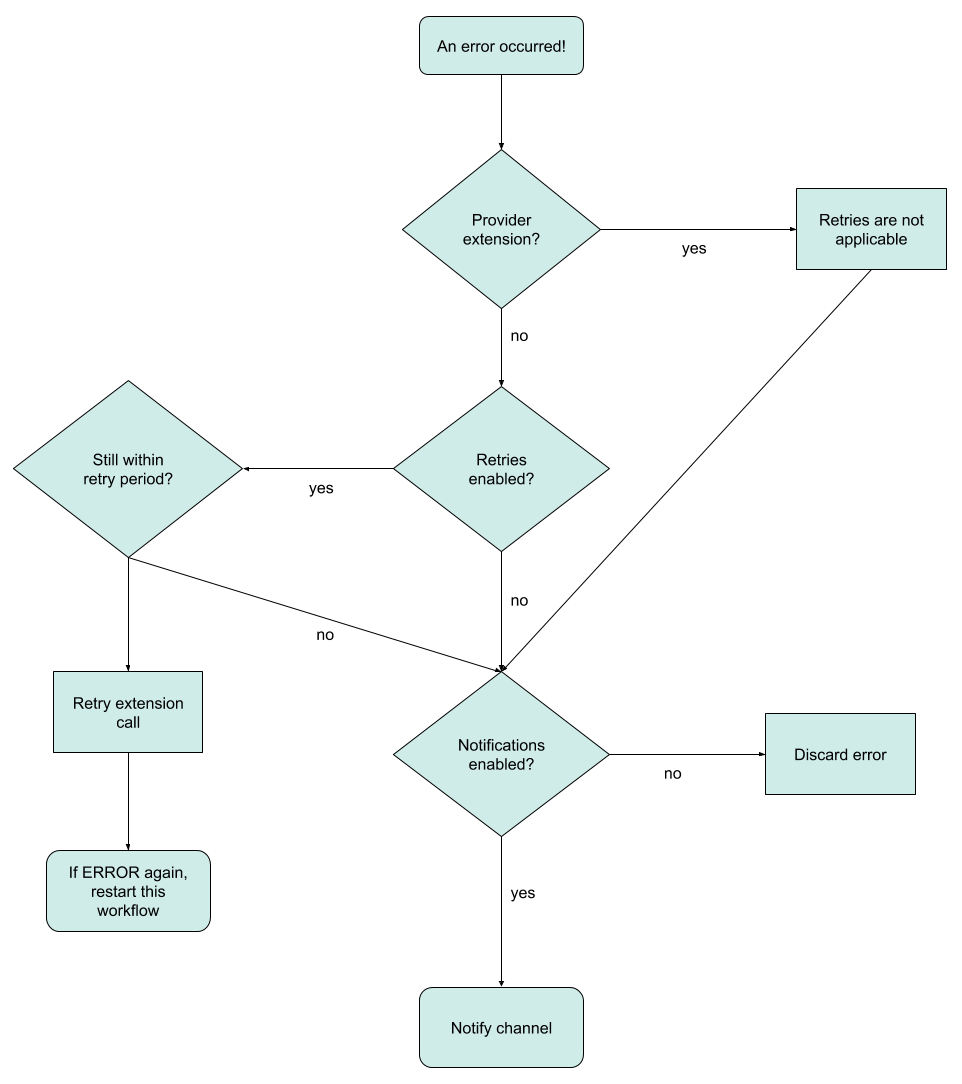
funnel.travel has a simple but powerful retry / notification configuration in case of extension errors.
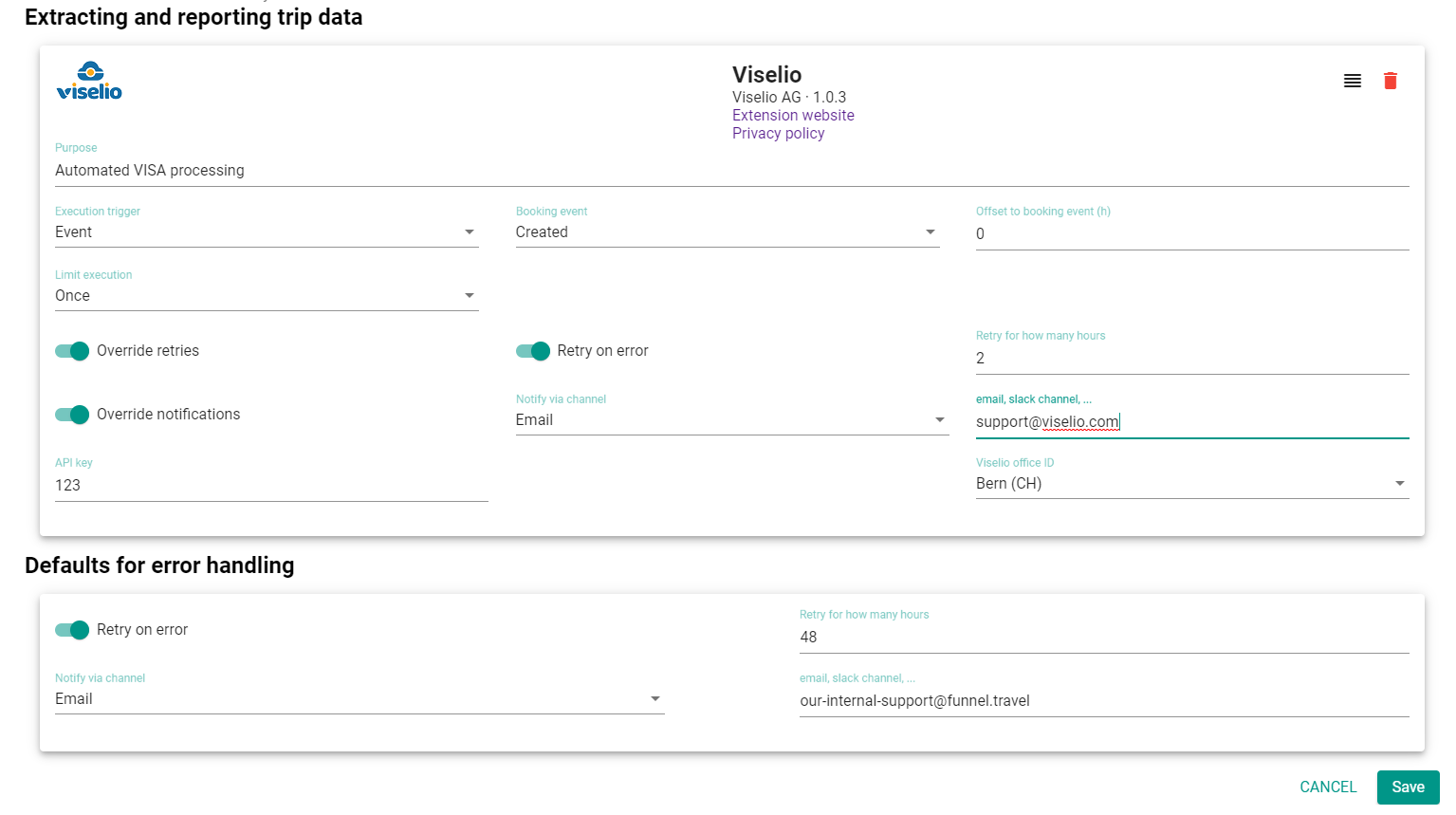
Defaults for error handling
Retry on error
If enabled, funnel.travel will re-try calling the extension periodically (about every 15min). If disabled, the ERROR state can only be resolved manually.
Retry for how many hours
Only relevant if "Retry on error" is set. Describes the maximum time span since the first call attempt during which retries should be attempted.
Notify via channel
Currently available options are:
NONE | EMAIL | SLACK | RINGCENTRAL | TEAMS
Channel
For 'EMAIL': the email address the notification should be sent to.
For 'SLACK': the Slack webhook the notification should be sent to. For 'TEAMS': the Teams 'Incoming Webhook' URL
The default settings can be overridden per extension. The workflow is:
Trip management
Trip detail view
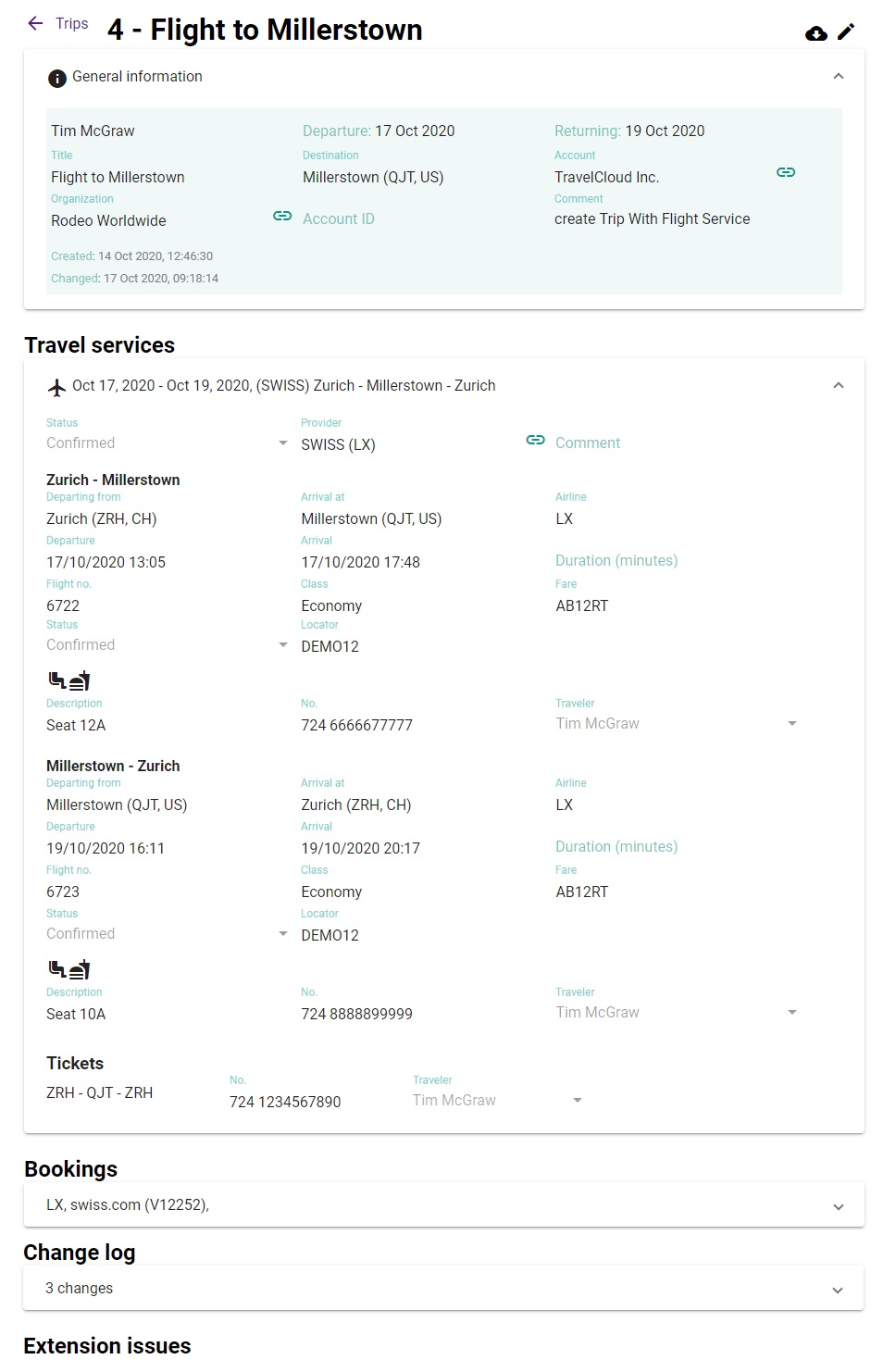
The trip detail view gives an overview of the travel services, the bookings, a change log and the status of extensions related to this trip. Action
buttons on the top right allow for switching to edit mode, or download the trip as a JSON file.
5BACSC
Customers and travelers
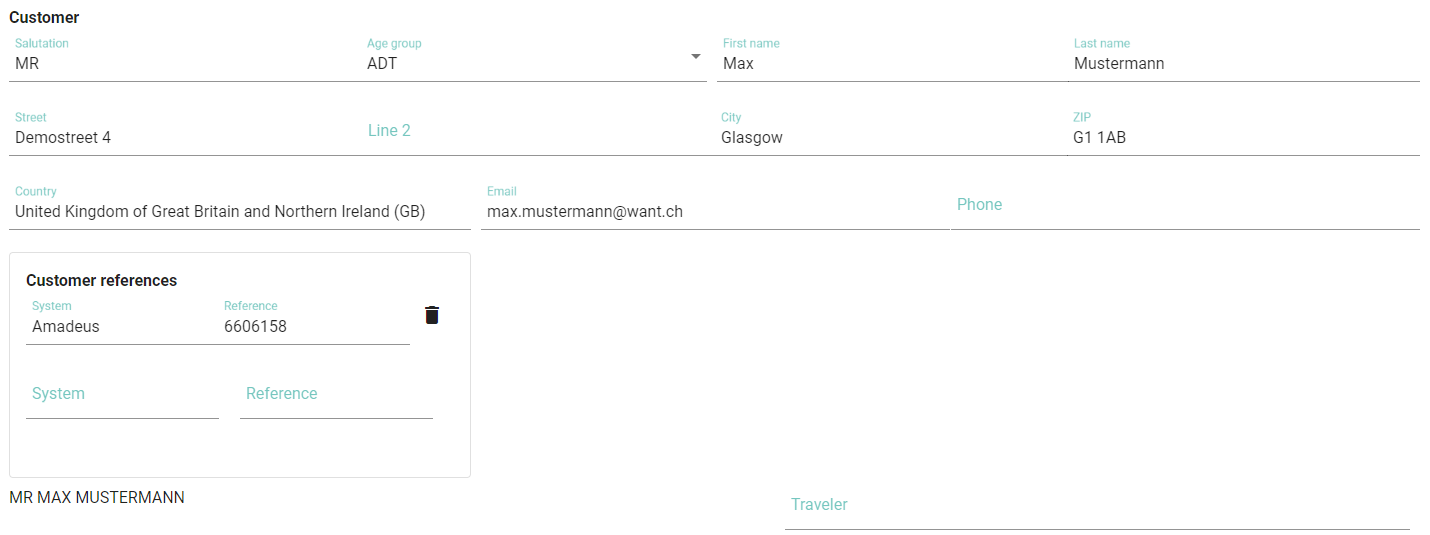
funnel.travel takes a trip-centric view to customer management. Each booking can hold address and contact
information for one customer, this is typically the invoiced customer (i.e. not necessarily the traveling customer).
Customer data is not sync'ed across bookings, so if Max Mustermann has several bookings, his
address information is duplicated per booking
Apart from address and contact data, funnel.travel can hold 0..n customer reference numbers. These are useful
when a producer extension can send a customer reference relevant to a downstream consumer extension.
Travelers are managed according to the "Traveler handling" setting on the billing account.
If traveler profiles are kept in funnel.travel, a profile can be assigned to the booking traveler. A very common approach
is to use an external profile system tool and manage profile locators in the booking. With this apporach, no traveler
profiles need to be kept in funnel.travel.
Searching
Additional to the standard search options, the trip search offers a few special keywords:
in:currently_away
.. will return all trips where the current date is between departure and return. Other valid "buckets"
for trips are extension_errors, departing_soon and recently_returned.
returnedbefore:4
.. will return all trips with a return date within the past 4 months.
ref:AB12CD
.. will search for booking reference number AB12CD.
Assigning to an organizational unit
For a new trip, funnel.travel will assign the trip to an organizational unit based on the following criteria:
If the booking has a known participant, the organizational unit of that participant is assigned
If the booking source and agent sign matches a user identifier of type 'LOCATOR', the organizational unit of that user is assigned
If the booking agent sign is an email and matches a technical user, the organizational unit of that user is assigned
If the booking agency ID matches a agency locator, that organizational unit is assigned
Finally, the largest organizational unit is selected as default
KM8OP5
Matching to an existing booking
For an incoming, new booking, funnel.travel will attempt to locate an existing business trip which to append the booking to.
An existing trip will be used based on the following criteria:
The existing trip has at least one matching participant
Attempt to match participants based on e-mail address
Attempt to match participants based on full name (APIS), in the versions 'firstname lastname' and 'lastname, firstname'
Attempt to match participants based on full name (non-APIS), in the versions 'firstname lastname' and 'lastname, firstname'
The departure date of trip and new booking match +/- one day
The return date of the trip is +/- one day equal to the departure date of the new booking (ie. the new booking appends to an existing trip)
The departure date of the trip is +/- one day equal to the return date of the new booking (ie. the new booking prepends to an existing trip)
The travel dates of the trip are entirely encompassed by the travel dates of the new booking
The travel dates of the new booking are entirely encompassed within the travel dates of the existing trip
P7UU7M
Updating trip data
When using the web client to edit trip data, an internal technical reference (UUID) is used to determine which
data entries are to be updated. This approach is deterministic and always yields an updated trip (and the bookings therein)
matching the data edited on the screen.
When receiving a booking data update through an extension, however, there typically is no technical reference to work with.
In such cases, funnel.travel attempts to locate existing entries based on identifying properties which are assumed to be immutable.
As consequence, a change in these identifying properties leads to deletion of the "old" entry and insert of the "new" entry.
Example: given an existing trip with a flight ZRH - EDI, flight no. LX123, departing June 6th at 10.15am. If
an extension now sends booking information for a flight ZRH - EDI, flight no. LX123, departing June 6th at 2.20pm,
funnel.travel will match this to the existing flight and update the departure time. If an extension then sends
booking information for a flight ZRH - EDI, flight no. BA999, departing June 6th at 10.55am,
funnel.travel will not match this as the flight number is expected to not change. Consequently,
the existing LX123 flight is deleted, and BA999 is added as a new flight.
Identifying properties
Flight
Departing airport
Departure date (but not time)
Flight number
Hotel
Hotel name
Date of arrival
Confirmation no. (if a matching confirmation no. is found, the above properties are not considered 'identifying')
Rental car
Provider name
Date of pick-up
Confirmation no. (if a matching confirmation no. is found, the above properties are not considered 'identifying')
ZT7P3M
Trip data issues
There are only very few data issues which influence data processing in funnel.travel
Missing traveler references make trip matching impossible, but also has a negative effect on reporting
Missing provider references make reporting per provider difficult
Unknown destinations make reporting per destination difficult
Trips with data issues are listed on the dashboard in the 'Issues' column
FG6M3R
Trip extension issues
If an extension call resulted in an ERROR, the call can be retried manually by clicking on the icon.
Using an external traveler profile suite
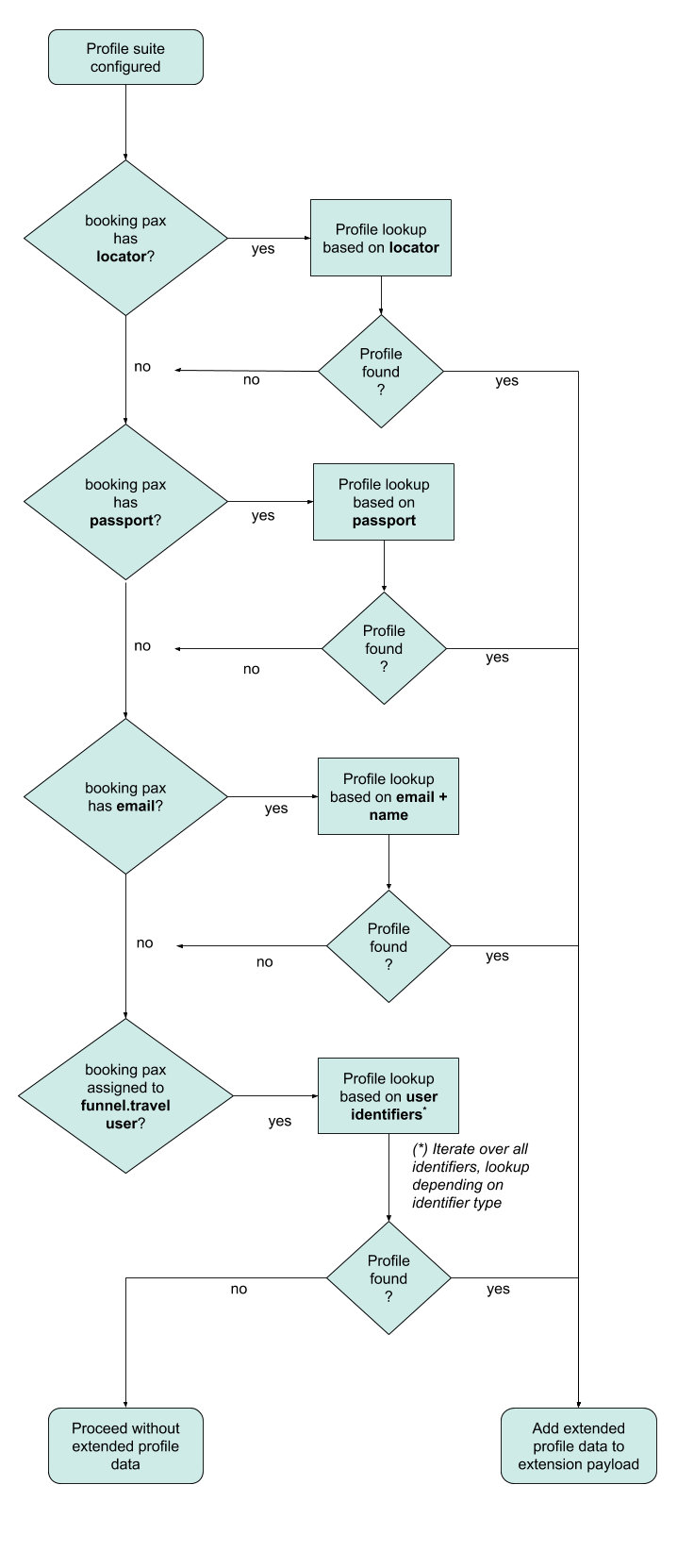
If a traveler profile suite is configured (see billing account setup), funnel.travel will attempt to augment
booking data with extended profile data per passenger. In the following sequence, there is a distinction between the 'booking traveler' and a
'funnel.travel user'. The former is bound to the booking, and contains only data provided by the producer extension which created the booking. The
latter is a user. Each booking traveler can be associated to a funnel.travel user, but it is common practice to work only
with booking travelers and not maintain a funnel.travel user base.
The lookup hierarchy is:
Use the booking traveler's source ID, if present. For Amadeus this would be a CSX profile locator
Use the booking traveler's passport, if present.
Use the booking traveler's email, if present. Results returned by the external profile system are matched
against the booking traveler's name, in order to prevent mismatches when an arranger's e-mail is used
If the booking traveler is associated with a funnel.travel user, use the funnel.travel user's identifiers.
GFH88M
Using an external payment provider
While funnel.travel does not hold credit card numbers, it does allow to pass on tokenized data from an external payment provider. On the
Extension setup page a callback link is displayed. For payment providers offering a webhook callback holding
payment transaction data, this URL can be configured in the payment provider system. funnel.travel will then receive the transaction data,
link it to a booking via transaction ID, and make the form of payment data available to downstream extensions.
KM63SD
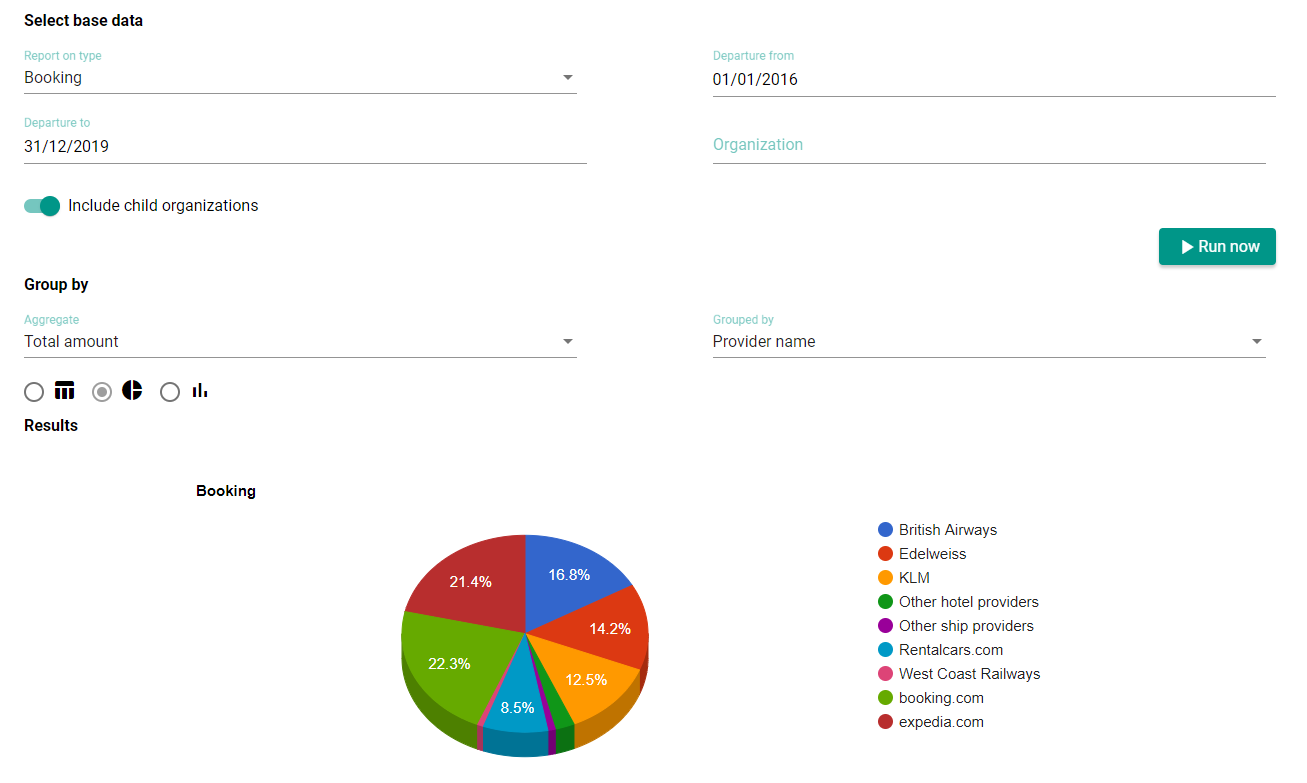
Reports
funnel.travel offers a very basic built-in reporting. For any more advanced reporting, an extension should be
used to export data in the desired format.

 icon.
icon.